WorkSpace
A workspace is a segregated Corridor Environment within the same organization. This is accessible to only a set of users within the organization. A workspace(s) is created by the Tech Admin and can be accessed using common login credentials (no workspace specific login credentials). A user can be a part of multiple workspaces (in which case they will need to be explicitly added to each workspace by an Admin)
Things to remember
- A workspace operates as a separate instance even though it is supported by a common unique software installation
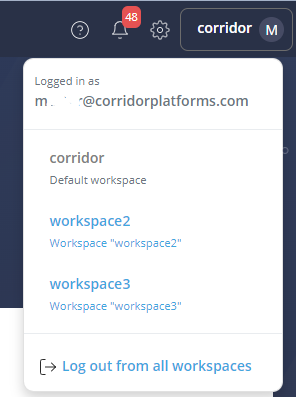
- While logging in the User is directed to a default workspace from where they can navigate to other workspaces
- During a given work session within Corridor a user can see and navigate through multiple workspaces
- User can switch to different workspace(opens in new tab) through header menu(above logout)
- If a User logs out from one workspace, by default he will be logged out from all other workspaces
- Data registered on an instance cannot be shared with any other workspace and it is not affected by the any work or any objects in the other workspaces
- Workspace access is based on User Role
- A User can have different role in different workspace
- Workspace cannot read tables that are used by other workspaces
- A user cannot share artifacts, documents (exported), approved features/ Data Elements, Models policies etc from one workspace to another
Info
- Jupyter notebook and Third party tools are shareable between the workspaces.