Explainer Model
Overview
An explainer is a model that can be used to measure the contribution of one input field to either an individual prediction (local contribution) or the overall sample prediction (feature importance). The platform allows registering an explainer for the model.
How is this used?
Model Explainer is defined while registering a model.
How to create a Explainer Model?
Refer to Registering a Model Explainer section for details.
How to access Explainer Values?
The platform also provides users with the capability to access and analyze the explainer values which in turn will allow users to interpret the model’s predictions better.
If a model explainer is registered, the contributions will be generated every time the model is executed. These values can be used to generate Feature importance statistics and charts.
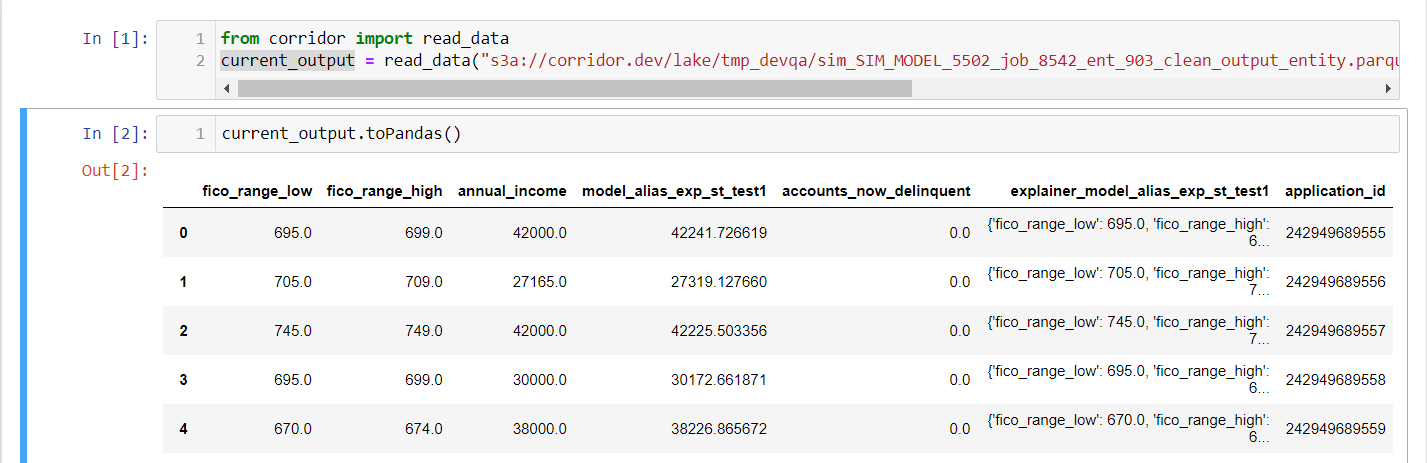
The explainer output will be a dictionary of importance values for each of the features, which can be found in the output data along with input columns, target column and model output. This is the same file which would be auto-generated by the platform once the job is completed can be found on the job detail page.
The format of the file would be parquet by default, though it can easily be loaded in the corridor integrated Jupyter Notebook and converted into required format (for e.g. Pandas DataFrame) for further analysis.
The output file link as seen on the job-detail page after the model simulation is completed :
-
Model Simulation Output Data Link

The explainer values which is present in the above output file along with the model inputs and output can be accessed in the notebook as mentioned in the below snip :
Note : The name of the explainer column will be : "explainer_{model_alias}"
-
Explainer Values