Skip to content
User Manual
Location
Initializing search
User Manual
Overview
Version History
Version History
Overview
Release Notes V1.26.01
Release Notes V1.25.10
Release Notes V1.25.9
Release Notes V1.25.8
Release Notes V1.25.5
Release Notes V1.25.4
Release Notes V1.25.3
Release Notes V1.24.0
Release Notes V1.23.0
Release Notes V1.22.1
Release Notes V1.22.0
Release Notes V1.21.0
Release Notes V1.20.1
Release Notes V1.20.0
Release Notes V1.19.0
Release Notes V1.18.0
Release Notes V1.17.1
Release Notes V1.17.0
Release Notes V1.16.0
Release Notes V1.15.2
Release Notes V1.15.1
Release Notes V1.15.0
Release Notes V1.14.2
Release Notes V1.14.1
Release Notes V1.14.0
Release Notes V1.13.1
Release Notes V1.13.0
Release Notes V1.12.0
Release Notes V1.11.0
Getting Started
Getting Started
Overview
Login/ Logout Pages
WorkSpace
Home Page
Settings
Settings
Overview
Role
Role
Overview
Role Details
Change History
Users
Table Keys
Platform Entities
Groups
Permissible Purposes
Keywords
Approval Workflow Settings
Flags
Custom Fields
Custom Screens
Platform Settings
Resources
Resources
Overview
Global Functions
Global Variables
Runtime Parameters
Algorithms
Artifact Repository
Reports
Dashboard Views
Reason Codes
Notifications
Notifications
Overview
Email Notifications
Job Board
Job Board
Overview
Objects
Objects
Overview
Entities
Tables
Data Elements
Features
Quality Procedures
Notebooks
Algorithms
Datasets
Experiments
Model
Model
Overview
Transforms
Explainer Model
Product Type
Configuration Parameters
Products
Frameworks
Frameworks
Overview
Valuation Function
Framework Metric
Framework Invocation Scenario
Policies
Strategies
Segments
Artifacts
Rules
Registries
Registries
Overview
Object Details
Object Details
Overview
Status
Status
Overview
Draft-in-draft
Version
Name
Attributes
Attributes
Overview
Location
Data Type
Alias
Assigned Entity
Is Aggregate Indicator
Additional Information
Additional Information
Overview
Attachments
Notes
Definition
Definition
Overview
Source Table
Source Column
Input(s)
Definition (Formula)
Lineage
Lineage
Overview
Precedents
Dependents
Execution Graph
Object Specific Sections
Object Specific Sections
Overview
Columns (In Table Registry)
Rules (In Quality Check Rules)
Explainer Model (In Model Registry)
Training And Validation Data (In Model Registry)
Properties
Properties
Overview
Description
Permissible Purpose
Group
Keywords
Custom Fields
Dashboards
Dashboards
Overview
Reports
Reports
Overview
Descriptive Statistics
Compliance Reports
Model Specific Reports
Model Specific Reports
Overview
Model Quality
Feature Importance
Policy Specific Reports
Policy Specific Reports
Overview
Policy Summary
Strategy Specific Report
Customizing Report
Job Details
Creating custom reports on platform
Jobs
Approvals
Change history
Impact Assessment
Tasks
Tasks
Overview
Registering Objects
Registering Objects
Overview
Registering a Table
Registering a Quality Procedure
Registering a Data Element
Registering a Feature
Registering an Algorithm
Registering a Dataset
Registering an Experiment
Registering a Model
Registering a Model
Overview
Registering a Model Explainer
Registering a Transform
Linking a Dataset to a Model
Registering a Product Type
Registering a Product
Registering a Policy
Approving Objects
Approving Objects
Overview
Request Approval
Approve, Reject, Cancel or Close
Approval Queue
Approval Workflow
Modifying Objects
Modifying Objects
Overview
Edit
Copy
Clone
Update Inputs
Import
Delete
Save changes
Reviewing Objects
Reviewing Objects
Overview
Request Review
Quick Runs
Quick Runs
Overview
Running jobs
Running jobs
Overview
Simulations
Validations
Comparisons
Verifications
Activating Policies
Activating Policies
Overview
Champion Vs Challenger
Shadow Mode
Single Policy Activation
Exporting Artifacts
Managing Artifacts
Exporting Documentation
Downloading Job Data
Sharing Objects
Requesting Object Access
Optional tasks
Optional tasks
Open Objects With Third Party Applications
Data and Analytics Solutions
Data and Analytics Solutions
Overview
Data Vault
Data Vault
Overview
Table Registry
Quality Check
Data Element Registry
Feature Engineering
Feature Engineering
Overview
Feature Registry
Model Studio
Model Studio
Overview
Alerts
Datasets
Experiments
Model Registry
Notebooks
Decision Management Solutions
Decision Management Solutions
Overview
Product Management
Product Management
Overview
Product Type Registry
Product Registry
Framework Registry
Policy Management
Policy Management
Overview
Generic Policy Management Procedures
Generic Policy Management Procedures
Policy Management Procedure
Policy Details
Framework
Offer Creation
Strategies
Single Record Review
Prospecting
Underwriting
Customer Management
Monitoring Dashboard
Monitoring Dashboard
Overview
Governance Dashboard
Metrics Dashboard
Permissible Purpose Monitoring Dashboard
Activity Dashboard
Notebook faq
Notebook faq
Overview
Jupyter Notebook Examples
Jupyter Notebook Examples
Introduction
Corridor integrated notebook
Corridor package
Accessing information through corridor notebook overview
Accessing raw data
Accessing registered objects
Accessing metadata of registered objects
Sharing objects
Imports
Accessing job results
Running jobs through the corridor notebook overview
Creating datasets
Running Simulations
Running Comparisons
Running Validations
Doing exploratory analysis using integrated notebook overview
Exploring raw data
Creating new aggregations and features
Model building and result analysis using integrated notebook overview
Building models
Tutorials
Tutorials
Overview
Key Things to Know Before Starting
Corridor Platforms Quickstarter
Understanding Entities
Understanding Table Structures
Best practices
Best practices
Registering Data Elements and Aggregates
Running Jobs
Building a Framework
Creating Aggregates
Corridor Notebook Commands
How to import external models
How to import external models
How to import H20 to Mojo PMML
How to Import SAS Model
Policy Creation and Evaluation Process
Use Cases
Use Cases
Implementing a full life cycle Model development, Governance & Approval Workflow
Implementing a Prospecting Policy to Optimize offers to Prospects based on lifetime profitability
Mapping Data Tables to Corridor System entities for an Underwriting Use case
Setting up Model Monitoring Performance Post Approval
Configure Credit Line Increase (CLI) policy on the Platform
Algorithm to Build Model using A Multi-Library Comparison Method
Support
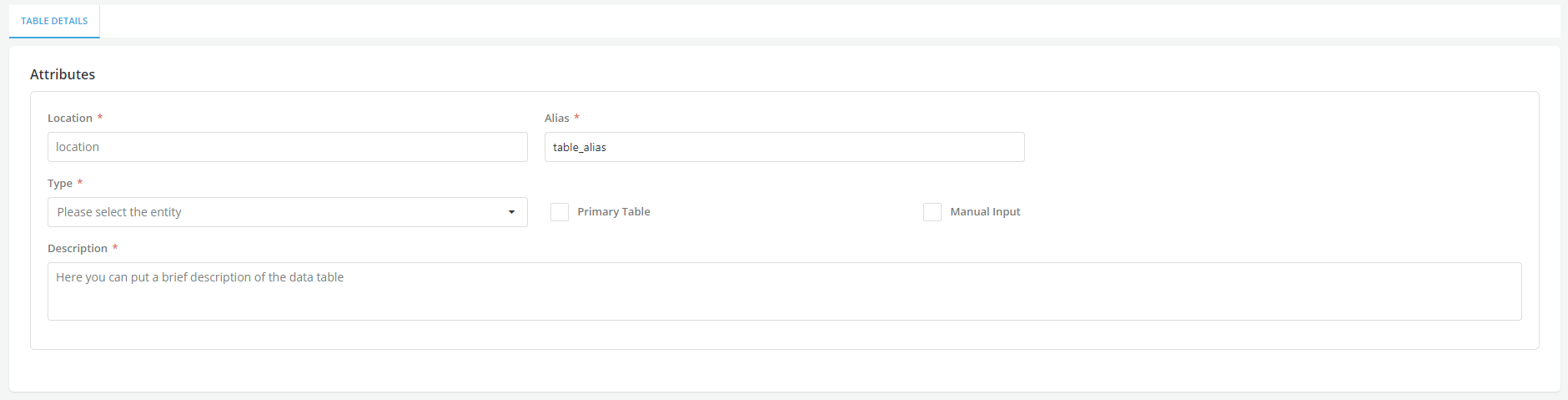
Location

Overview
For
tables
this designates the location where the
source table
is stored.