Managing Artifacts
Overview
An Artifact is a bundle of documents, including an executable script, that gets generated once an object is approved. Any item registered in Corridor - be it a Data Element, Feature, Model, or Policy - can be extracted out to be run in a separate environment. The artifact can run independently of Corridor in an isolated runtime environment or production environment.
The artifact aims to:
-
Extract the logic/items registered in Corridor - to then use it outside Corridor
-
Self-sufficient with all information encapsulated in the artifact
-
Have minimal dependencies on the runtime-environment where the artifact is run later
An artifact is created when an item is approved in the Corridor. For example: when a Data Element, Feature, Model Policy is finalized (Approved) and cannot be edited anymore.
Where is this done?
Refer Exporting Artifacts section for details.
How to use an Artifact
The artifact contains all metadata information as well as dependencies needed to solve the item registered. It exposes a python-library or a python-function which can be used to run the end-to-end logic to create the item that was exported - from the initial tables in Table Registry. The artifact broadly consists of the following files:
-
metadata.json
-
versions.json
-
input_info.json
-
python_dict.py
-
pyspark_dataframe.py
-
Additional information about features etc. used
The metadata.json contains metadata information about the folder it is in. It will have information about the model, it’s inputs, it’s dependent-variable, etc. It also has any other metadata information registered in the platform like Groups, Permissible Purpose, etc..
The versions.json contains the versions of libraries that were used during the artifact creation - python version, etc.
The input_info.json contains the input data tables needed to be sent to the artifact’s main() function. The input always has to be sent in the form of:

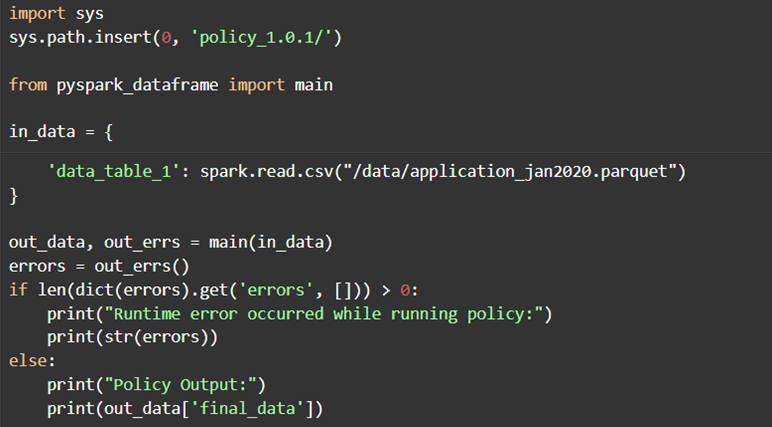
The pyspark_dataframe.py and python_dict.py files contain the end-to-end python function which can be used to run the entire artifact. They support different execution engines:
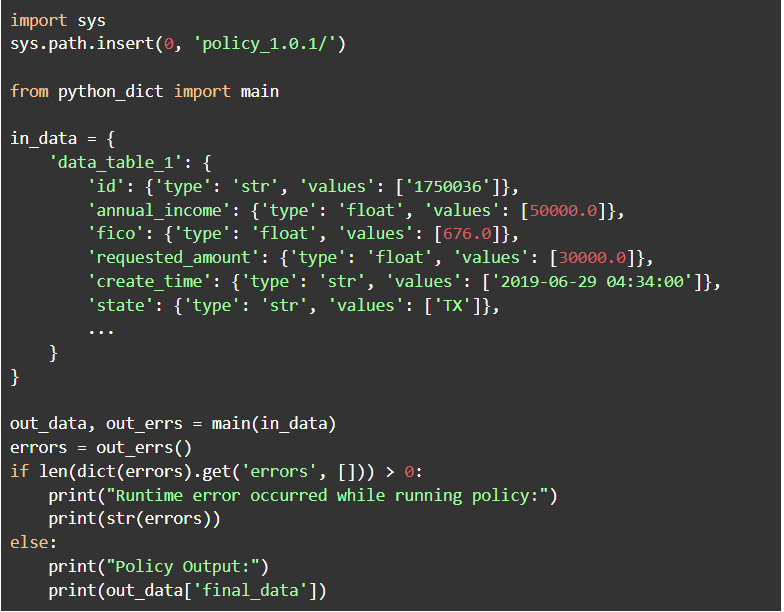
- API execution in a Python environment (python_dict.py)
To run the artifact, call the main() function in the artifact with the needed data. The python_dict.py contains a main() function into which data can be sent - in the form of a python-dictionary for low-latency execution. A data table in the dictionary format is described as a dictionary with type/values. For example:
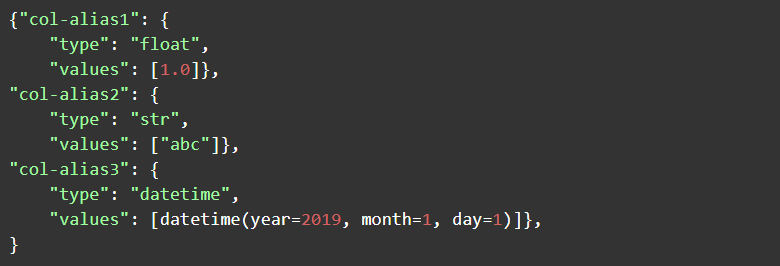
The pyspark_dataframe.py contains a main() function into which data can be sent in the form of a pyspark dataframe for execution on large data. A data table in spark is described by a Spark DataFrame.
Example
Example 1 Calling python_dict.py- This is an example of how to call the python-dict artifact:
Example 2 Calling pyspark_dataframe.py- This is an example of how to call pyspark-dataframe artifact: