Registering Data Elements and Aggregates
Overview
On Corridor Platforms, the Data Element module sits in between the DataTable module(raw input data) and the rest of the modules (Feature, Model, etc.).It takes in the raw input data, applies any standard data preprocessing logic, and exposes the standardized data to the rest of the platform, where more customized logic can be built and implemented.
This tutorial covers the following sections:
- Guidelines on the types of Data Elements to be registered
- Examples for different types of Data Elements
- Pros and Cons summary of the different ways of registering a Data Element aggregate
How to choose type of Data Elements to register
The type of Data Element to register depends on:
- In what type of source table is the data stored?
- How much information should be exposed to the rest of the modules?
- Are there any standard treatment to be applied before exposing the data?
Types of the Source tables
There are 2 types of source tables:
- Entity level source table
-
Detailed source table
-
Entity level source tables are the data tables that have a only one record per entity key.
-
Detailed source tables are the data tables that have multiple records for each entity key.
-
When the source table is an entity level source table, there is only 1 record for each unique entity key. Simple Data Element can be registered to expose the data as scalar value for the corresponding column.
-
When the source table is a detailed source table, there are multiple records for each unique entity key, Data Element Aggregate should be registered.
How much information should be exposed
-
On Corridor Platforms, Data Element is the only module that can access the raw input data. All other modules will access the data through Data Element. The amount of information that’s preserved in the Data Element module is all the information that can be accessed by the rest of the modules.
-
Simple Data Element preserves all the information from the raw data since no aggregation is done.
-
For Data Element Aggregate, if the detailed information needs to be exposed, Data Element aggregate can be registered as a list to preserve the information at the record level. Otherwise, Data Element aggregate can be registered as a summary value to the chosen level.
Any standard logic to be applied before exposing the data
-
Standard data processing logic (data cleaning, imputation, etc.) can be applied when registering the Data Element. On one hand, when standardized data is exposed through Data Element, the rest of the modules don’t need to worry about applying the standardization logic. On the other hand, the standardization logic will be enforced.
-
For simple Data Element, currently no additional logic can be applied at the Data Element level.
-
For Data Element Aggregate, we can apply the standardization logic either to the list or the summary value.
Pros and Cons
For the different way of registering Data Element Aggregates:
| Definition | Pros | Cons | Recommend using when.. | |
| List Aggregation |
- Store Values related to an entity into a list |
- No loss of information - Broad downstream use |
- Downstream code must refer to lists rather than scalars |
- Information conservation is critical - There is no standard way of summarizing data |
| Summary Aggregation |
- Summarize all the values related to an entity in to one or several values |
- Eliminate noise of irrelevant details |
- Loss of information - Limited downstream use, if too, custom |
- Some detailed information be never used for business processes - There is a standard way of summarizing data |
| Data Cleansing |
- Delete or replace invalid or incorrect values |
- Eliminate bad data from start consistently for all users |
- Risk of information loss if deleted data has meaning |
- Applying standard and generic cleansing |
| Imputations |
- Infer actual values based on statistical or business assumptions |
- Provide complete data to users from start |
- Often custom hence doing them early might cause data proliferation |
- Doing standard imputations (e.g., regulatory) that apply to all use cases |
| Features Generation |
- Calculate new values to improve business measurement, prediction or decision |
- Expose more pertinent information to users from start |
- Often custom - Information loss |
- Creating standard features (e.g., regulatory) that apply to all use cases |
| Transformations |
- Analytically modify values to improve business measurement, prediction or decision |
- Expose analytically treated information to users from start |
- Often custom - Information loss |
- Applying standard modifications (e.g., regulatory) that apply to all use cases |
Examples
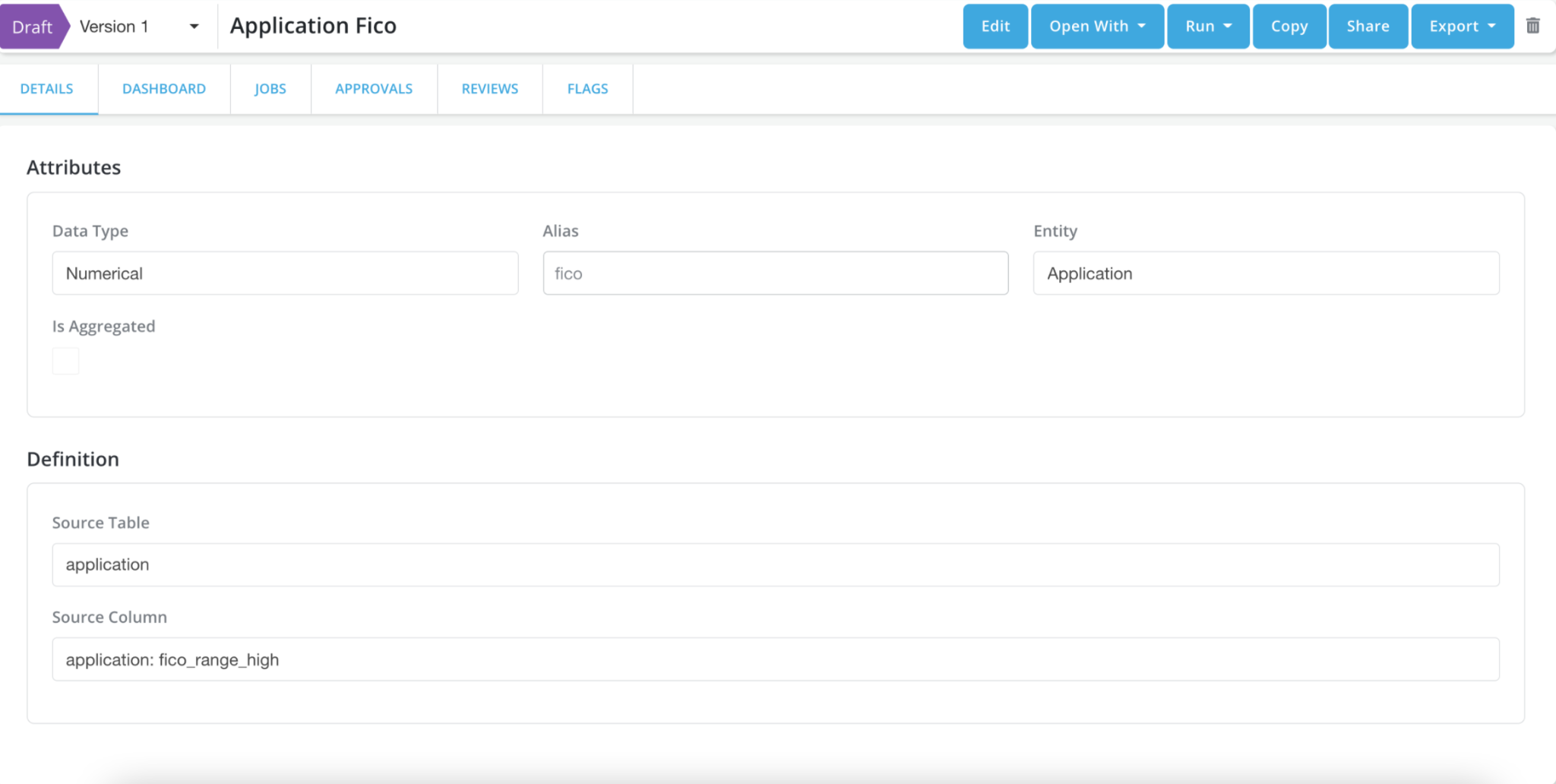
Simple Data Element
source table: application
| account_id | fico_range_hgh |
|---|---|
| 1 | 629 |
| 2 | 620 |
| 1 | 3000 |
| 2 | 2000 |
Data Element Registration:
Data Element Aggregate Registered as List
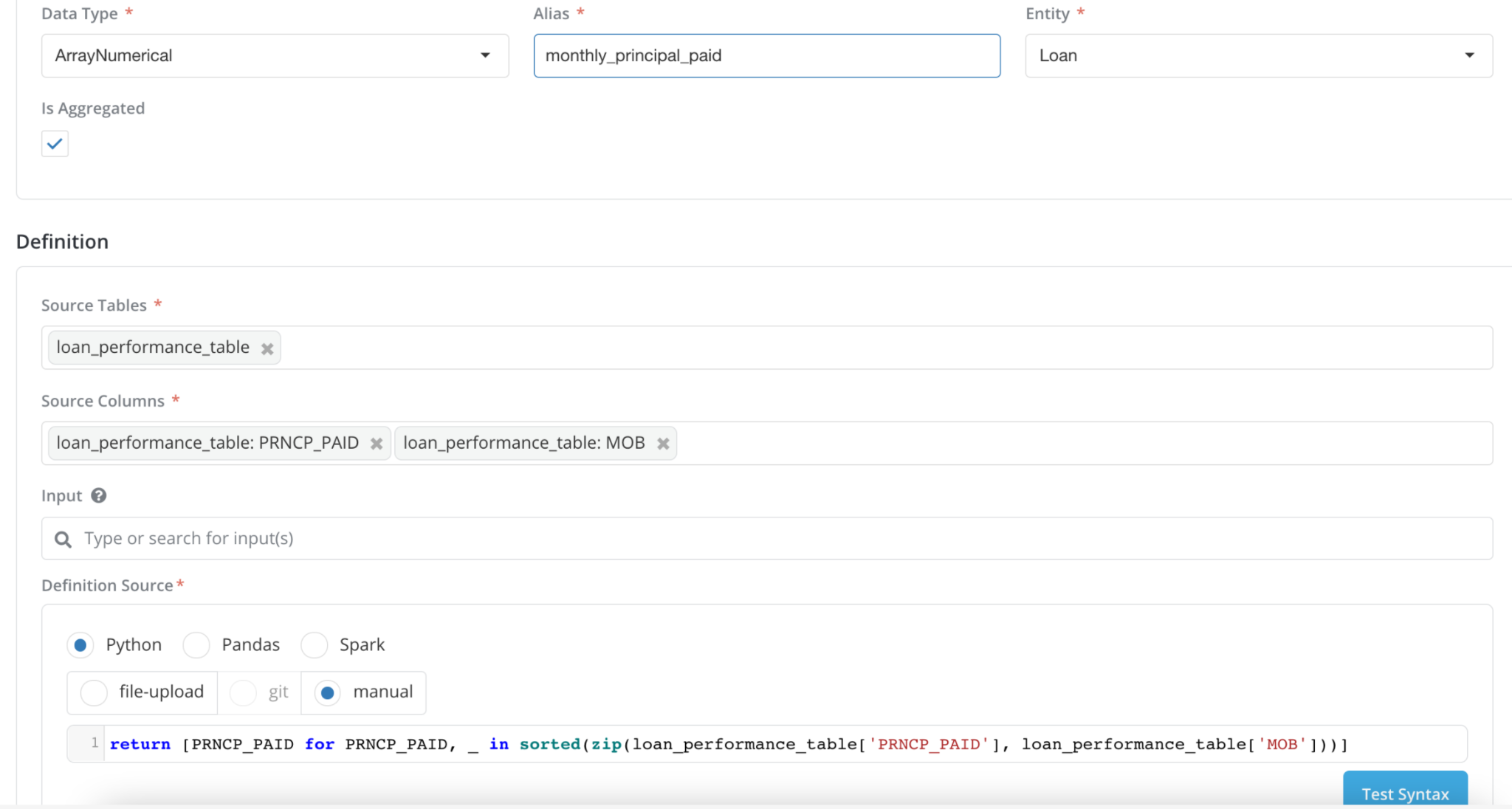
source table: loan_performance_table
| account_id | PRNCP_PAID | MOB |
|---|---|---|
| 1 | 1000 | 1 |
| 1 | 1000 | 3 |
| 1 | 3000 | 2 |
| 2 | 2000 | 2 |
Data Element Registration:
Data Element Aggregate Registered as standardized List
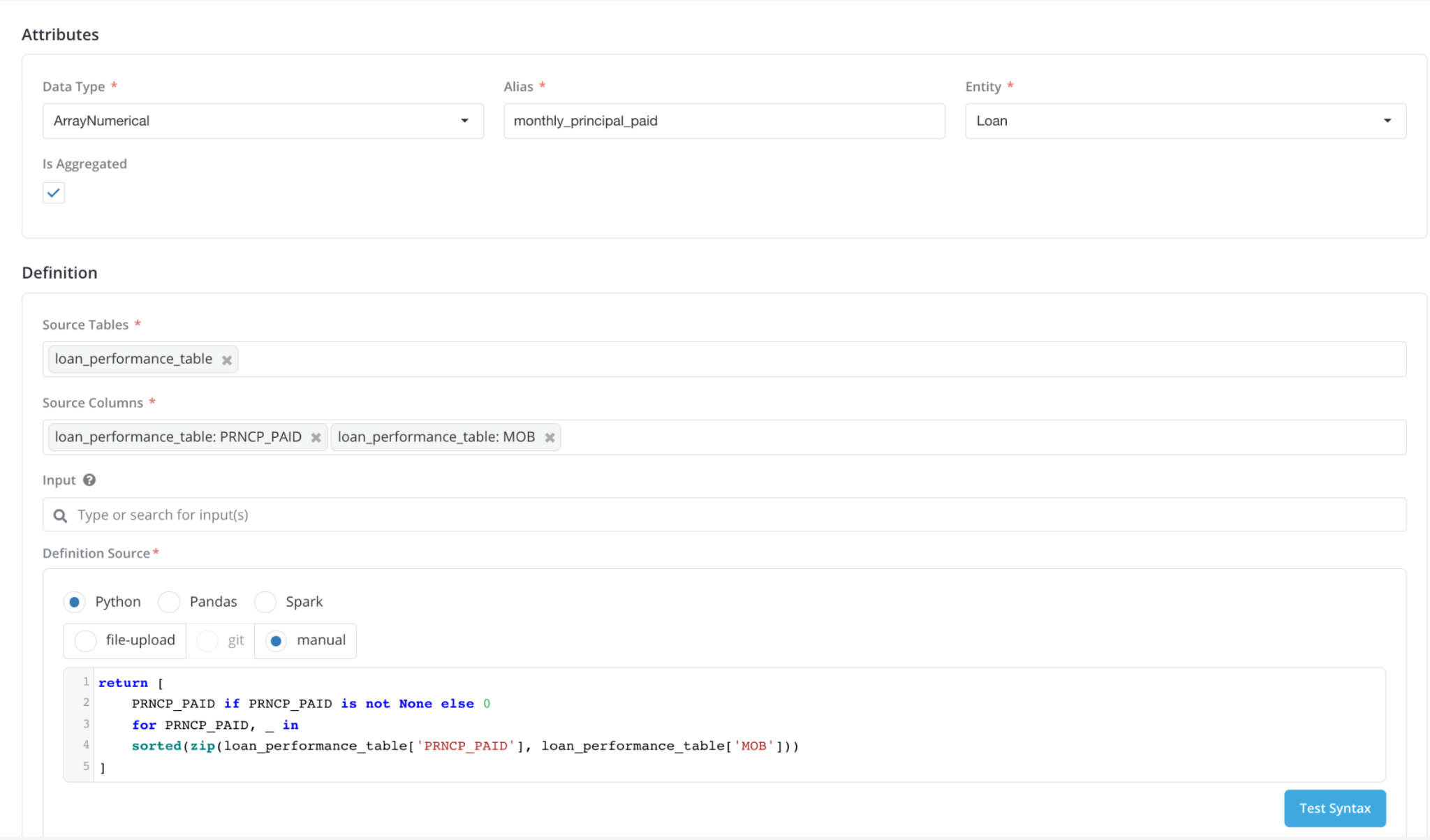
source table: loan_performance_table
| account_id | PRNCP_PAID | MOB |
|---|---|---|
| 1 | None | 1 |
| 1 | 1000 | 3 |
| 1 | 3000 | 2 |
| 2 | 2000 | 2 |
Data Element Registration (standardized logic applied for None handling):
Data Element Aggregate Registered as Summary Value
Input Table: loan_performance_table
| account_id | PRNCP_PAID |
|---|---|
| 1 | None |
| 1 | 1000 |
| 1 | 3000 |
| 2 | 2000 |