Release Notes V1.23.0
| Version | 1.23.0 |
|---|---|
| Release Date |
Changes
1. Registration
1.1 Quick Run to evaluate definitions without Spark Clusters
When registering data elements, features, or models - it is crucial to test that the registered logic is providing the results that were expected. Corridor has Job types like Simulation, Validation, and Verification that can help in running the logic on historical datasets to compare results for millions of records. But often it is easier to validate the logic on small datasets and not rely on your Big Data cluster. To achieve this, we have created the option to perform a “Quick Run”, in which the definition of objects can run on small data without needing to be queued for execution on the cluster. These quick runs have a time limit of ~5 minutes (which is configurable) and cannot be used on large data.
After registering an object, Quick Run can be found easily on the same page. Values can be either entered directly or an Excel file can be provided with the input data to run the object:
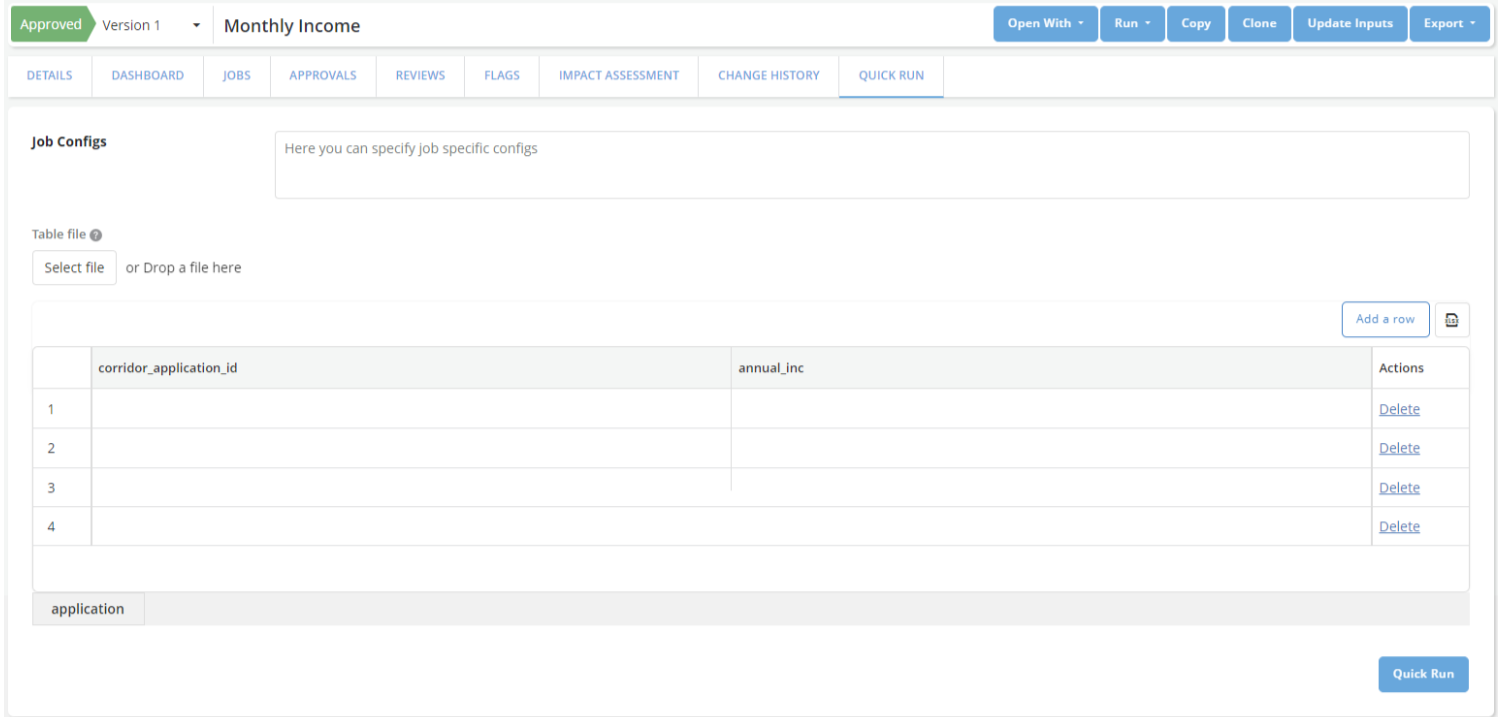
Note: When using quick run, there is no filtering of data available and reports are not generated. Only the calculated values of the object are available as output.
1.2 New Boolean-based Data Types
As part of an overall initiative to provide more intuitive data types for analytics, we now provide 2 new Data Types: Boolean and Array Boolean. Gone are the days when you need to use 0/1 encoded integers or Y/N encoded strings for boolean types.
1.3 Renaming the “Categorical” data type to “String”
The “Categorical” data type has now been renamed to the “String” data type. This data type can be used for both encoded values (like ordinal encoding) or long strings (like address, chat messages, etc.) which can be beneficial for more upcoming use cases like Large Language Models (LLMs).
2. Approvals and Reviews
2.1 Reviewer Permissions
Reviews are a slow and tiresome process. Sometimes, the reviewer may want to make some quick changes themselves to avoid the back-and-forth between the Requestor and Reviewer. In a manual world - reviewers rarely make such changes because it is difficult to track who made changes if this is opened to multiple people. But with Corridor, all changes are tracked automatically. So it is easy to trace back and get an audit history on the changes + notifications to all stakeholders involved.
This feature allows admins to configure an Approval Workflow with Responsibilities that are “Editable by Reviewers”:
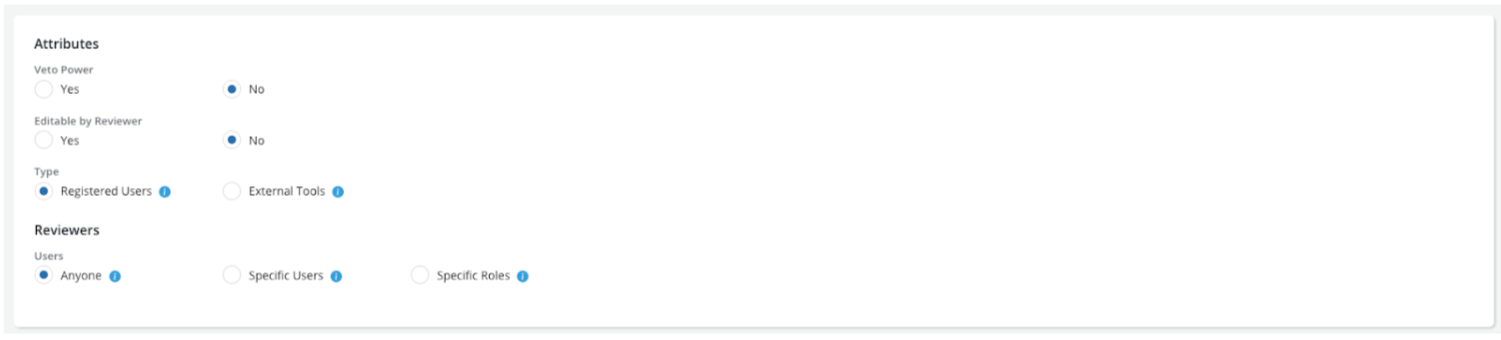
When a review request is sent to these responsibilities, the reviewer automatically gets “Write” permission on the object while the object is under review.
2.2 Attaching Jobs or Files as part of approval
When a reviewer is approving an object, they should comment on any observations and changes they need. Now, they can also attach jobs they ran on the object as part of their appraisal. And also upload files that they would like to record as part of their approval. All this information is tracked and recorded as part of the Approval History.
2.3 Grouped Approvals
In most cases, models and strategies should re-use existing data elements, features, global functions, etc. already registered, and approved, and have dashboards - to speed up development. But when creating a pipeline from scratch, it can get cumbersome to approve each object that was created in the analytical pipeline one by one.
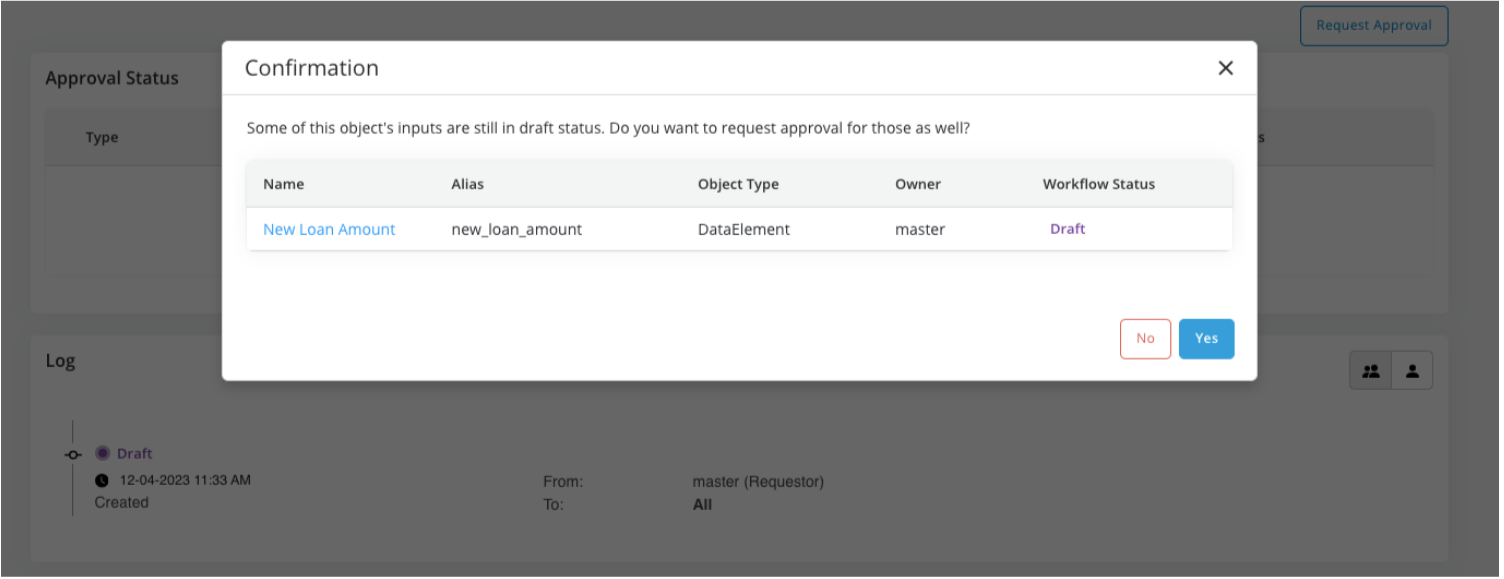
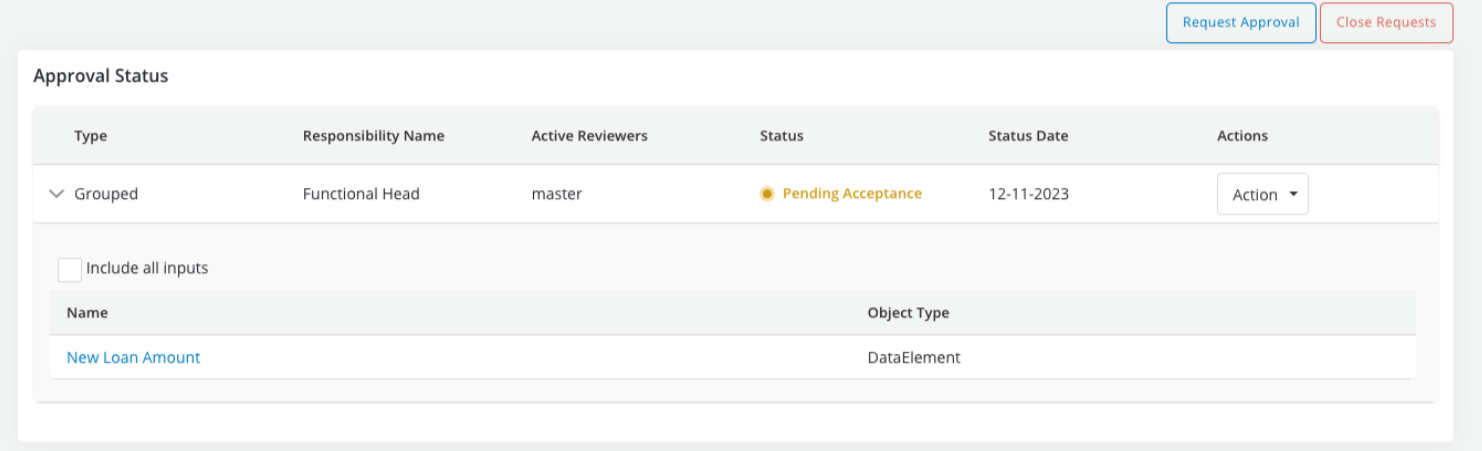
We have worked on supporting Approvals for multiple objects - which are part of a single lineage. So, when requesting a review - you can now additionally request the review of all the direct and indirect inputs being used in the object. It is highly recommended that Grouped Approvals be used with the ability to Additional Dashboards to make the review seamless and easier for the reviewer.
As part of the Approval Request, we can now add inputs that are being used in the lineage of that object:
Any action that is performed as part of this review, can be for all the inputs in the review or for the main object that is currently being reviewed:
Notable Mentions:
-
Instead of using the grouped approval option, if you wish to manually approve objects one by one, the list of unapproved items is sorted based on what should ideally be sent for review first. This can also help reduce confusion about what are the next steps required in case you do not wish to opt for this feature.
-
Earlier, there was no way for a requestor to bring back their object from “Pending Approval” to “Draft”. Now, it is possible for a requestor to “Close requests” and bring back the object to a draft stage for more work to be done on it.
3. Jobs
3.1 Reusing data pulls for jobs
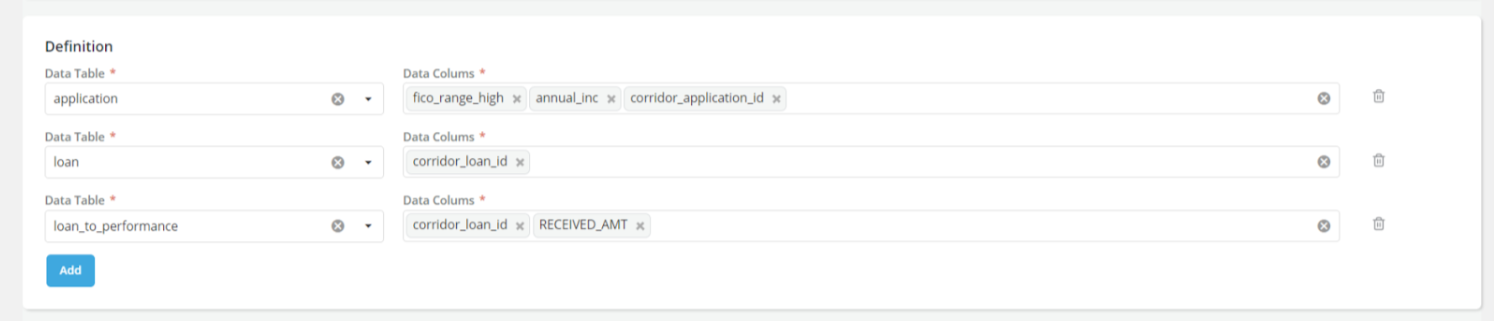
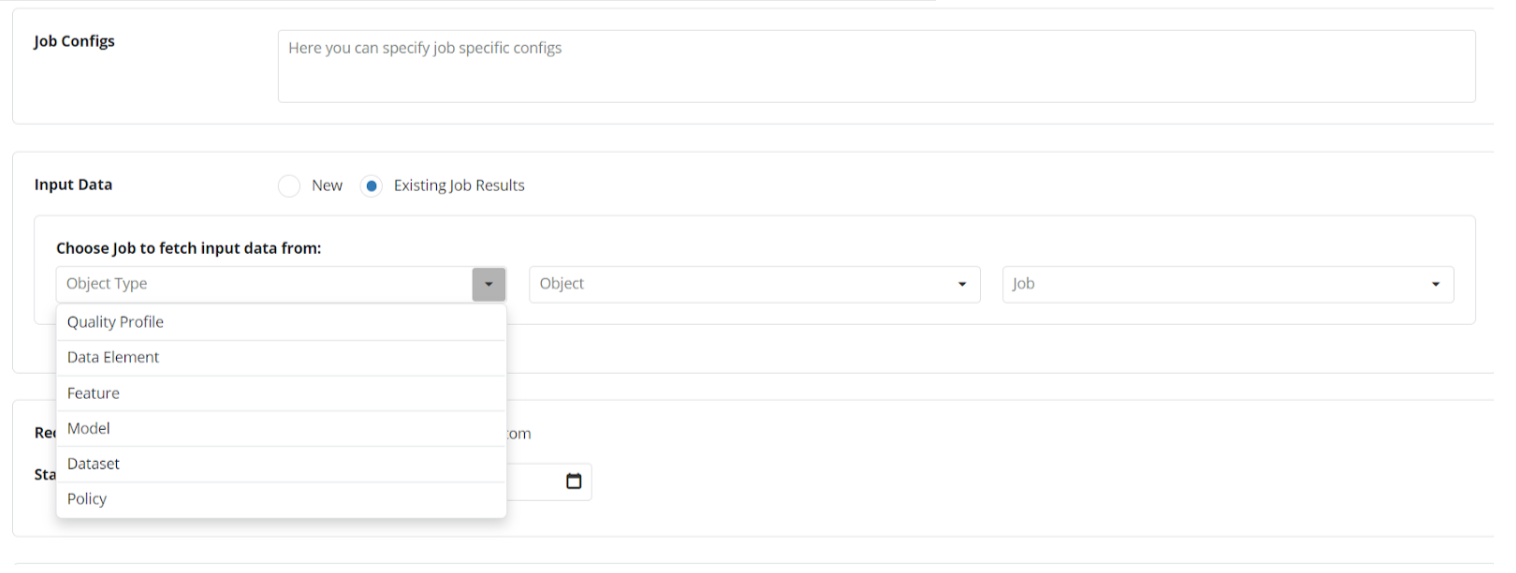
When working with big-data data lakes, pulling data from the data lake can be a slow process. Many times, it takes hours to pull data (even if it is 100s of records) from a big-data data lake, and a few minutes to run analytics on the pulled data. We now include a Dataset variant “Raw Data” datasets - which can help with pulling raw data from a data lake and re-using it when running Jobs.
You can define the tables and columns to pull from the data lake when creating a “Raw Data” Dataset:
And use the “Raw Data” Dataset as the input data in a Job:
3.2 Additional Dashboards in a Simulation
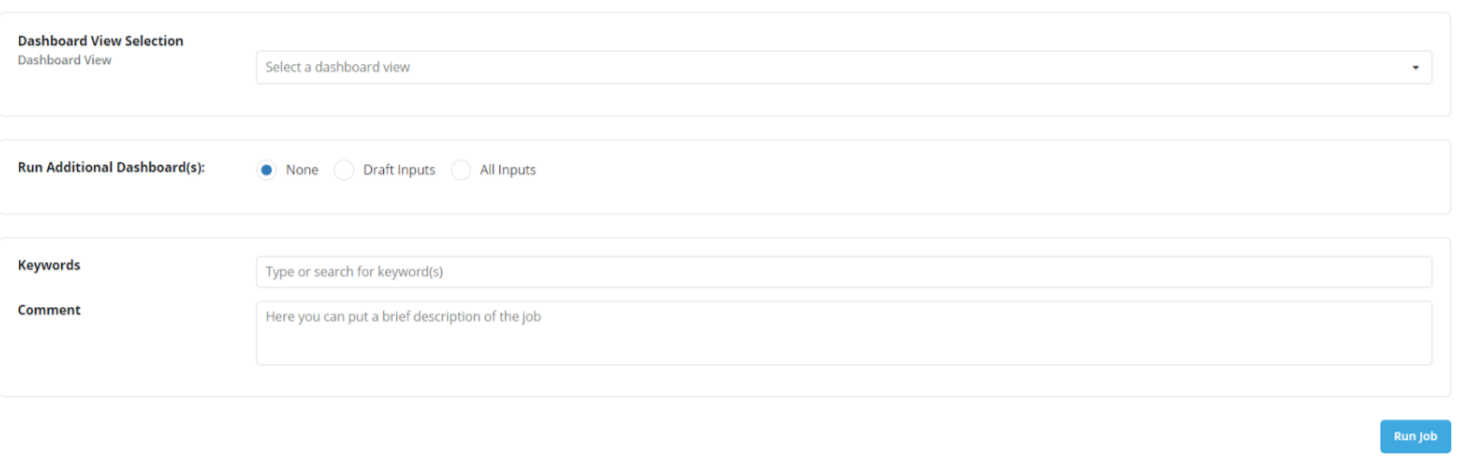
In most cases, models and strategies should re-use existing data elements, features, global functions, etc. already registered, and approved, and have dashboards - to speed up development. But when you’re working on a pipeline from scratch, it can get cumbersome to run jobs on each object that was registered one by one, and a more automated approach can be useful. We have worked on the ability to run additional dashboards for the direct or indirect inputs of an object when running a simulation, which should speed up the process.
When running a Simulation Job, now there is a new option to run additional dashboards along with the Simulation Job:
3.3 Flexible column names in Jobs
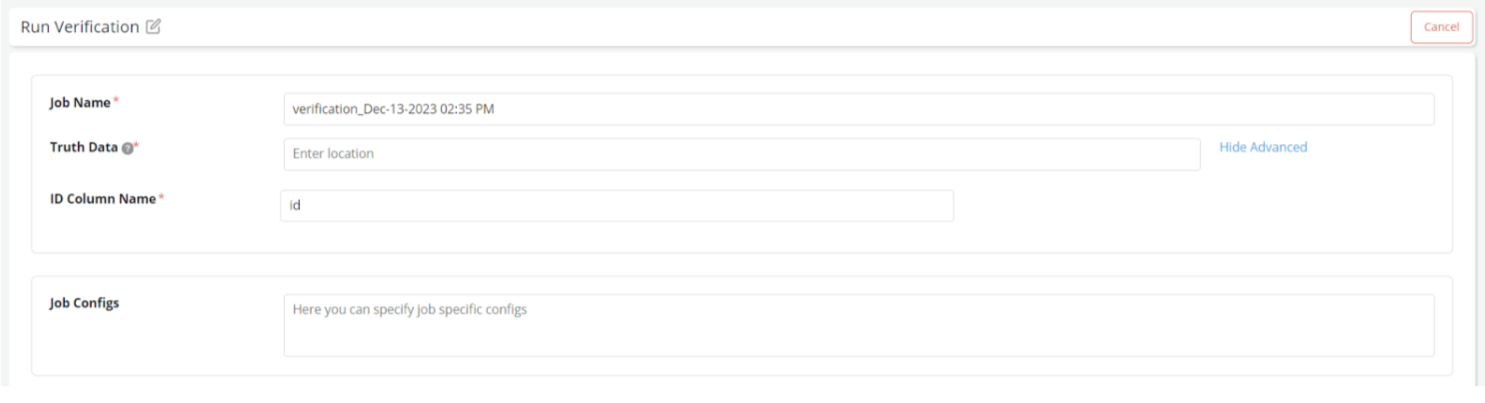
Typically, Corridor is smart enough to figure out the input data required to run jobs using the Lineage and Table Registry in the system. However, in some cases, the data provided is not based on the lineage. For example: The Pre-Specified ID filter and the Truth Data in verification jobs. This sometimes leads to some back and forth to rename the column names in files provided at these locations.
Now, we provide an additional option to provide your own column names and have a seamless journey to run Jobs irrespective of where your files were created.
A very simple option to provide your own custom column name for the “ID Column” is now available:
3.4 Tracking a Job Progress with Spark
While Corridor’s progress tracking can help understand what is happening when a Simulation is running - it can be useful at times to look at the tracking statistics provided by Spark to debug a slow-running Job.
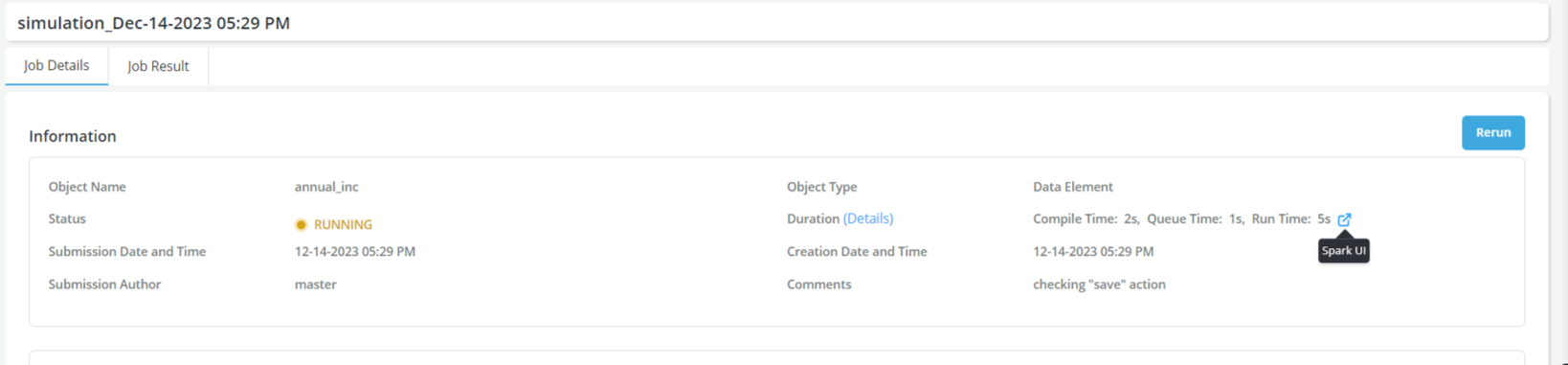
Required Configurations:
For this integration to work, The following configurations need to be provided in api_config.py:
-
SPARK_RM_UI_ENABLED → This needs to be set to True
-
SPARK_UI_URL → The prefix to use before the Spark Application ID for running jobs. For example: http://spark.example.com:8080/ will be prepended to the application ID to get: http://sparkhistory.example.com:8080/application_17368923323
-
SPARK_HISTORY_SERVER_URL → The prefix to use before the Spark Application ID for completed jobs. For example: http://spark.example.com:8080/ will be prepended to the application ID to get: http://sparkhistory.example.com:8080/application_17368923323
4. Dashboards and Reports
4.1 Support for Figures from matplotlib and seaborn
While Corridor already supported the feature-rich plotly library, sometimes moving away from existing reports in matplotlib or seaborn can be difficult! To make this transition easier, we now support matplotlib and seaborn figures as part of the Report Outputs in Corridor.
Note that while matplotlib and seaborn provide a lot of flexibility in creating charts and figures, as they are raster-graphics based they do not easily lend themselves to responsive web applications. So, when possible we recommend using Plotly figures to avoid responsive-ness issues.
4.2 Downloading Logs from Reports
To enable easier debugging for Report Writers - we now provide logs that were generated as part of the report generation separately on the report page in a Job Dashboard. Users can use the download logs button to download these logs to debug the execution of the report better.
5. Oversight and Administration
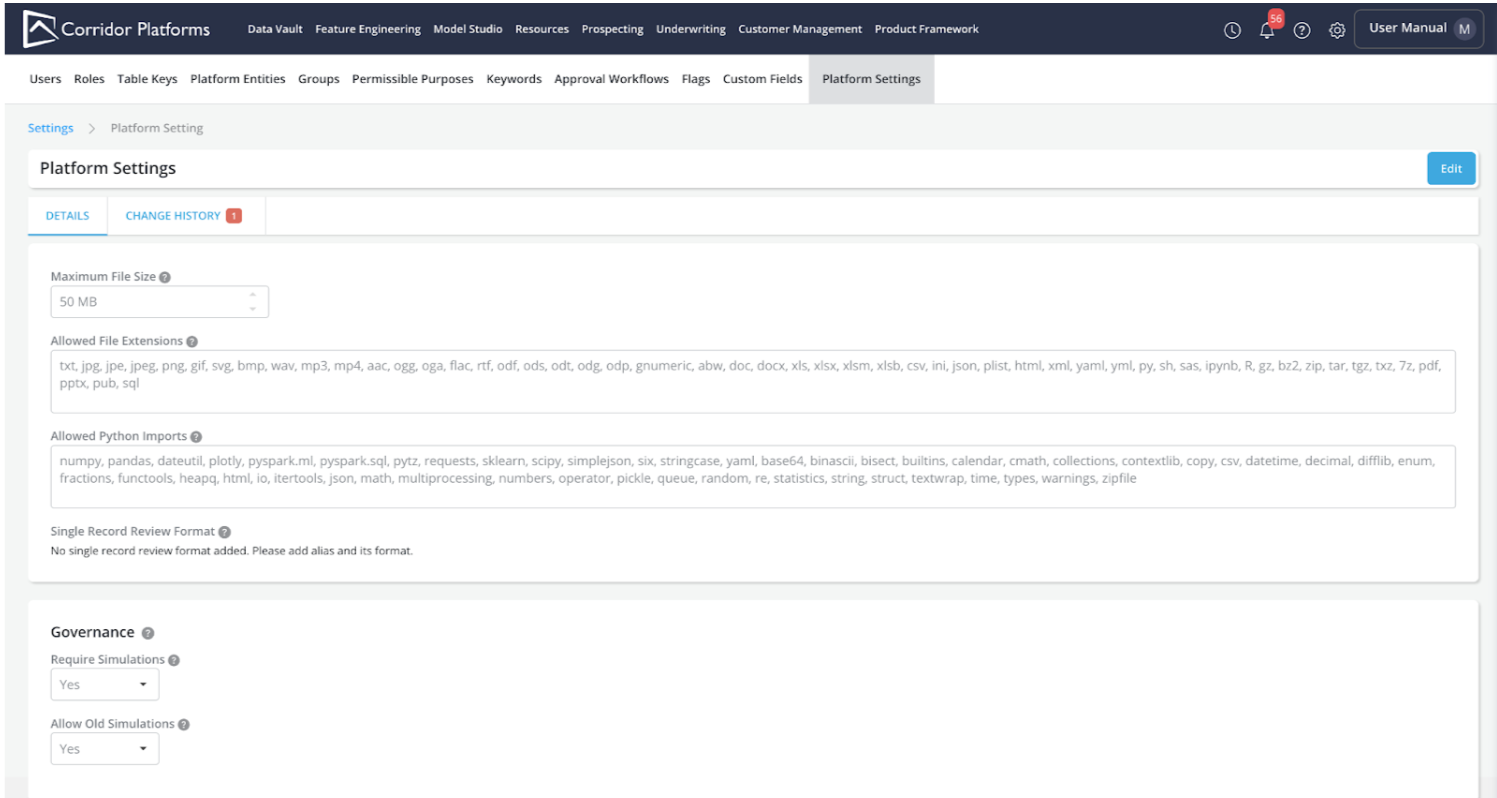
5.1 Platform Settings
A new page in “Settings” has been added called “Platform Settings” which allows quick access for administrators to configure various aspects of the platform. These parameters were earlier available in the api_config.py file on the server. And frequently required a Request For Change (RFC) process to make changes to them, and hence were affected by infrastructure freezes at an organization level. Now that they are available on the Settings page - they can be changed on the fly, and also have a clear Change History on what was changed, when it was changed, and who changed it.
A new section under Settings > Platform Settings is now available:
5.2 Monitoring of External Objects
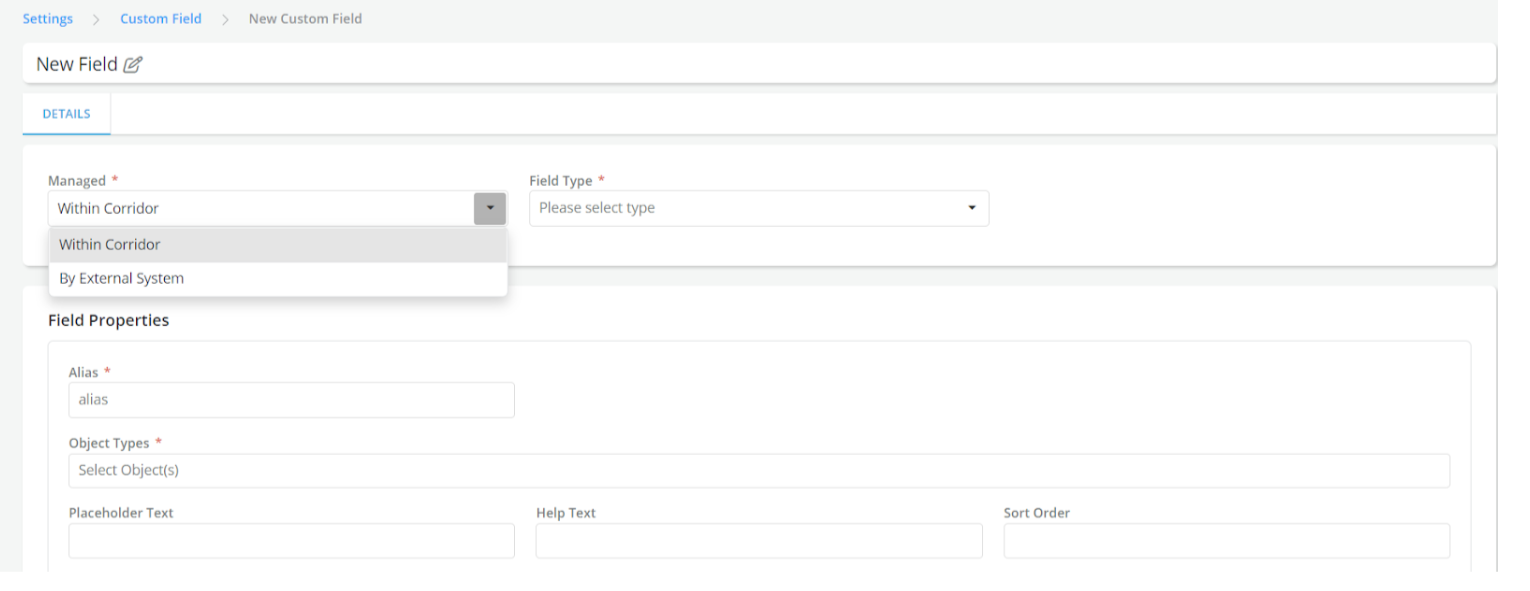
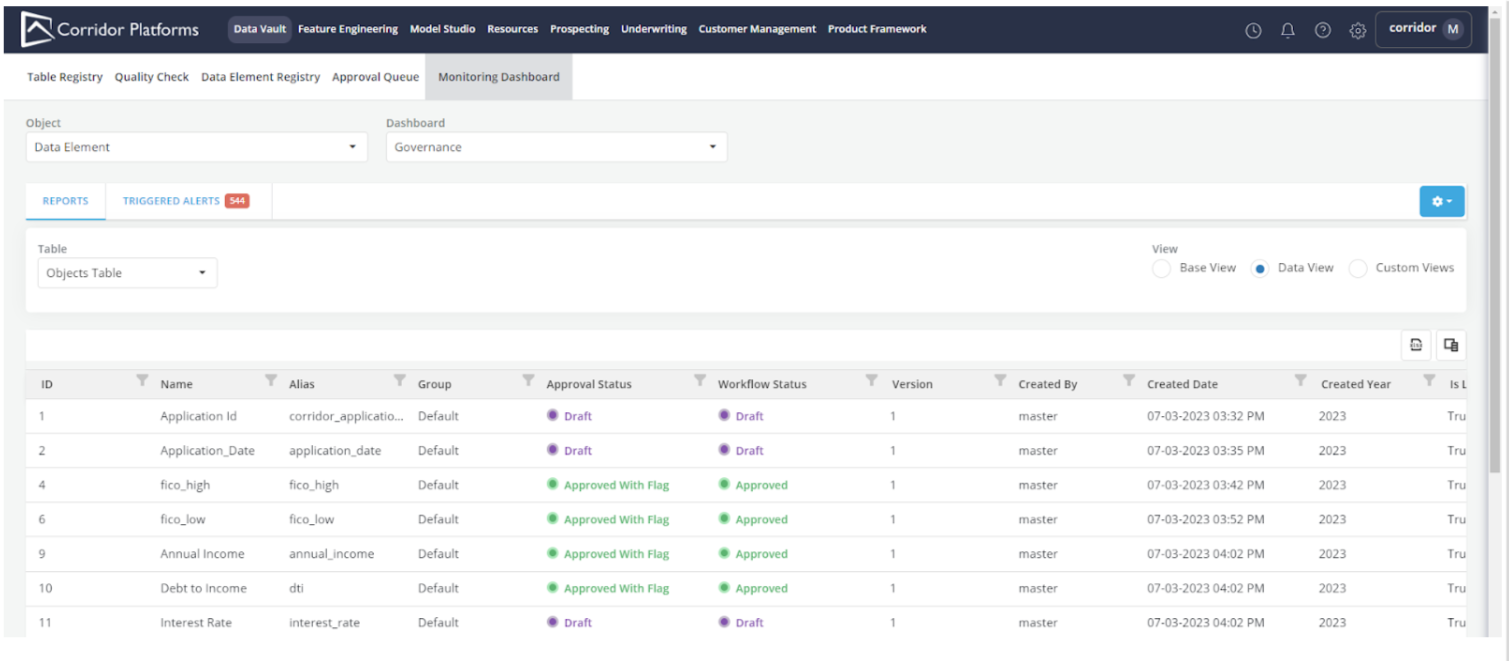
The Monitoring Dashboard which is an invaluable tool to get an overview of all things happening in the Platform, can now help you govern and manage data elements, features, and models that are being maintained externally and not yet registered on the platform. Earlier, this was enabled using Handler-based configurations, but now there is API connectivity using webhooks to fetch information from external sources. This also enables better auditing and change history tracking for the external attributes being provided to Corridor.
When a “Custom Field” is created which is managed by an “External System”:
We track information about it on every object page and also track Change History similar to other fields:
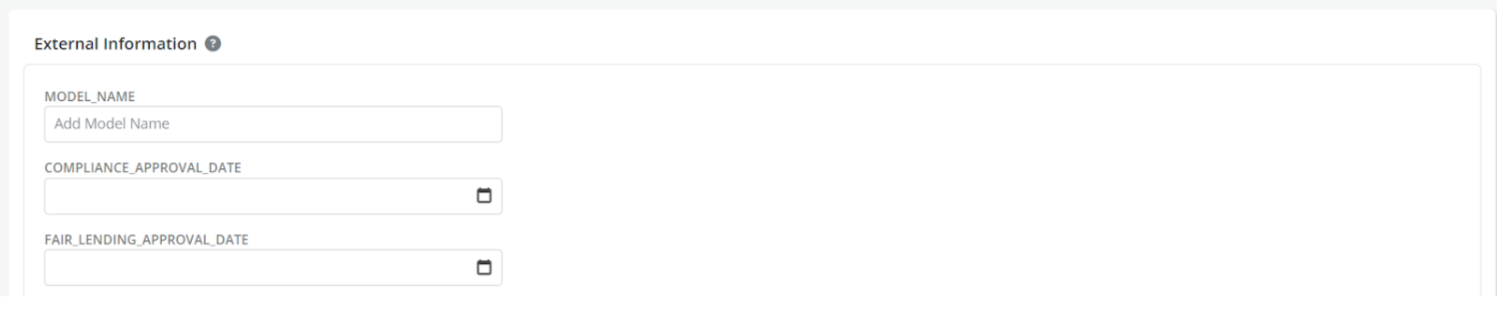
All the externally managed fields show up on the existing Monitoring Dashboard page:
6. Notable Mentions
1. Session Timer: If you’ve ever been confused about why you were logged out or how long before you will be logged out - Now, we have a session timer at the bottom left to show you the time remaining time before you will be logged out.
2. Snowflake Integration: Support for Snowflake as a Data Lake is now included as part of Corridor. To enable and use it, use the *_DATA_SOURCE_HANDLER configurations in api_config.py.
3. Continue Session for SSO-based logouts: If you’re linked to your enterprise SSO solution, you don’t need to break your flow when you logout and log back in anymore. If you don’t close your browser tab, and log back into the platform on the same tab, you will continue your session from where you left off.
7. Engineering
7.1 Deprecated support for MySQL DB
We do not recommend the use of MySQL databases as Metadata Storage RDBMS anymore. We have seen significant performance issues with MySQL and encourage users to go to Postgres for open-source solutions and Oracle DB for Oracle solutions.
7.2 Moving configs from api_config.py to the Platform Settings page
Some configurations in the api_config.py have been removed as they are now available on the Platform Settings page under “Settings”. More settings will be moved from the configuration file to the Platform Settings page which is more feature-filled and includes change history tracking for the configurations.
The following configurations have been moved:
- MAX_CONTENT_LENGTH
- ALLOWED_FILE_EXTENSIONS
- ALLOWED_PYTHON_IMPORTS
- SINGLE_RECORD_REVIEW_FORMAT
8. Backward Compatibility
-
The following setting parameters have been moved from the Configuration file to the new Platform Settings page:
- MAX_CONTENT_LENGTH
- ALLOWED_FILE_EXTENSIONS
- ALLOWED_PYTHON_IMPORTS
- SINGLE_RECORD_REVIEW_FORMAT
-
We have renamed the Data Type “Categorical” to “String” across the platform. The use of “Categorical” data type is now deprecated.