Release Notes V1.25.3
| Version | 1.25.3 |
|---|---|
| Release Date | 03-06-2025 |
Changes
1. Running Jobs
1.1 Improved experience when running jobs
Running jobs is a crucial part of everyone's workflow. This update brings a streamlined interface with well-defined sections for each field, ensuring clarity and ease of use.
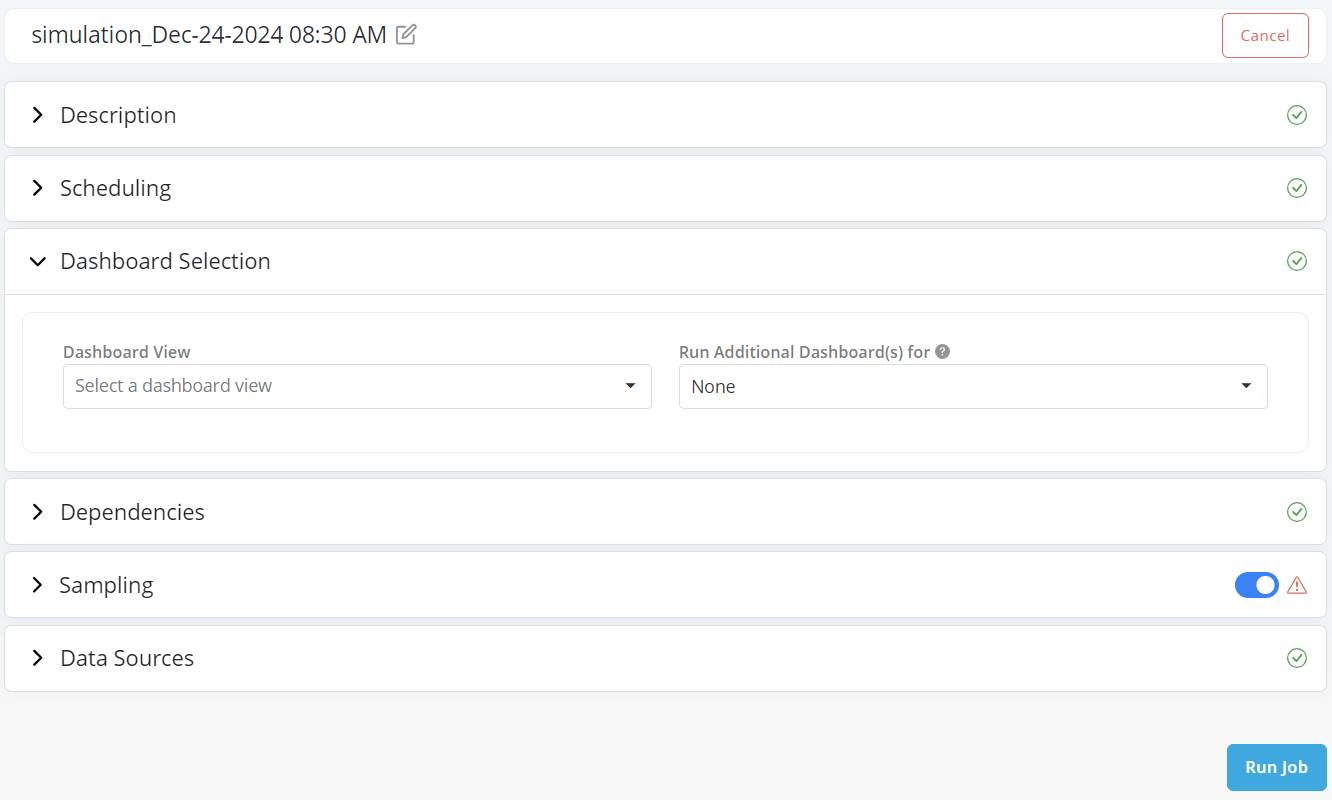
This is available in all types of jobs: Simulation, Comparison, Validation, and Verification. And the sections have been made consistent to make it easier to run any type of job easily.
1.2 Expressions in Subsetting Criteria
When running jobs - an important aspect is to select the input data that the job should run on. Subsetting Criteria is a key feature which helps to selectively filter input data tailored for each table, ensuring precision and efficiency. The criteria which are defined through conditional statements, are optimized for Spark and Big Data execution.
you can now utilize basic expressions in the conditions, such as: end_date \<= month + 1, to streamline and refine your data processing. This improvement is designed to enhance your data management processes, providing greater control and operational efficiency.

1.3 Use CSV and Excel files in Jobs
While Excel and CSV cannot support large data - they are useful to quickly run jobs with pre-filtered data which is already available.
When running a job on the platform, the data being used for the job needs to be provided in the connected data lake(s). For example:
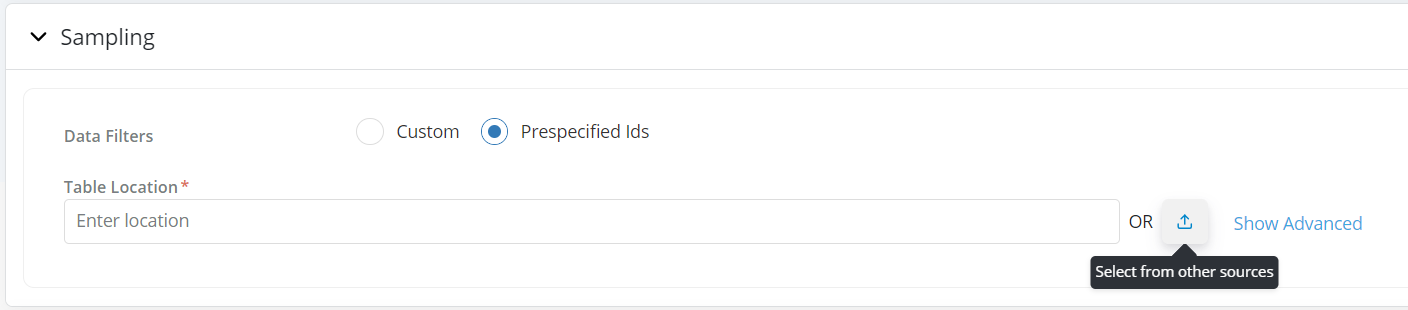
- Pre-specified IDs
- Truth Data (in verification)
- and Data Tables being used to run the job
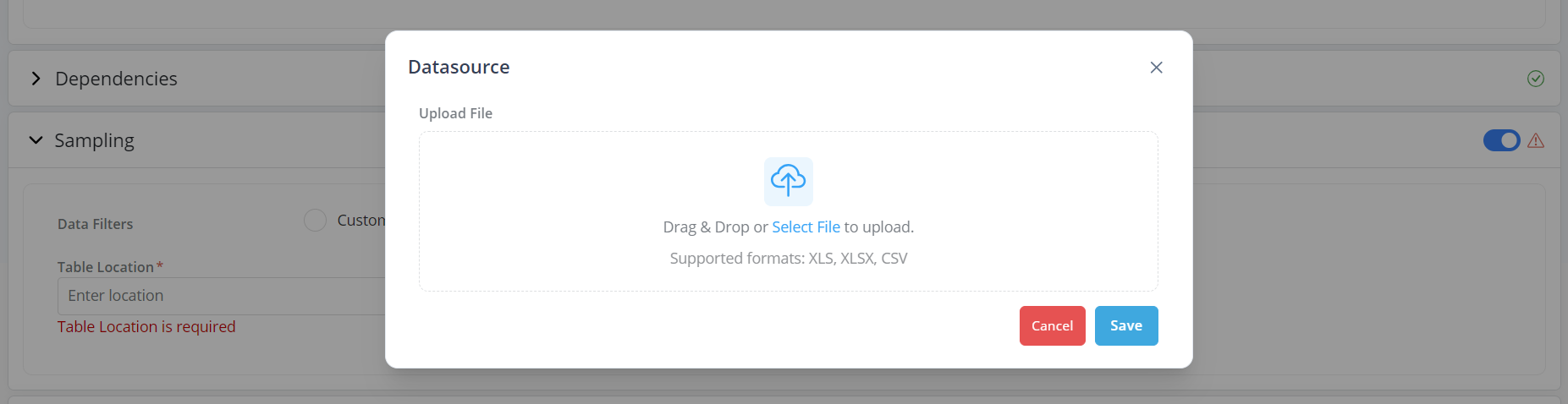
With this release, along with data from the data lake, small CSV/Excel files can be uploaded directly on the platform. This addition streamlines your workflow, allowing for quick and efficient job executions with readily available, pre-filtered data, eliminating the exclusive dependency on the data lake. And as always, this data is tracked by the platform and locked to ensure auditability.
2. Object Registration
2.1 Layout fields in Details pages
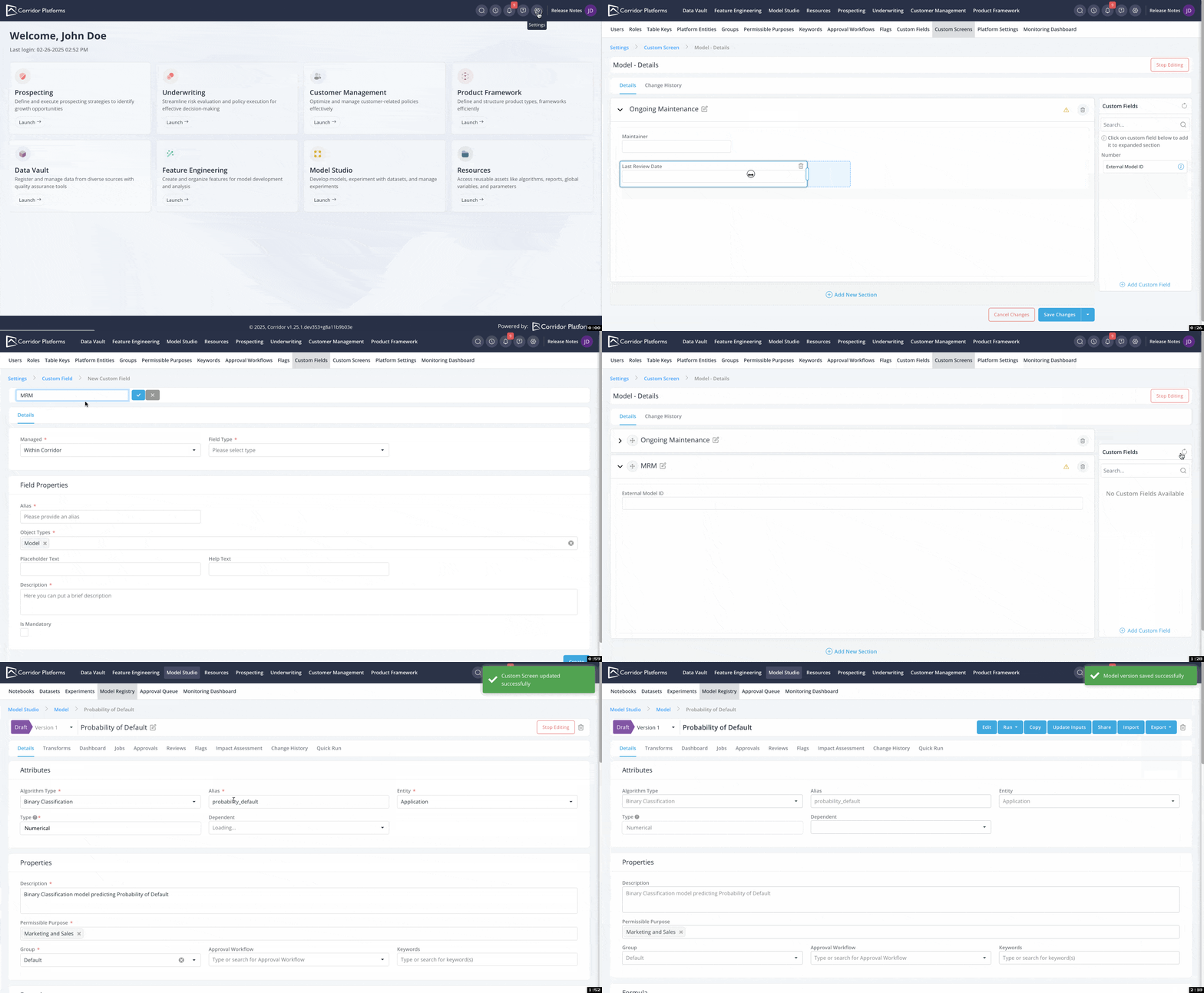
With the new Custom Sections feature, you have the flexibility to configure the information required when registering objects. For example, you can now set up an upload button for MRM documentation, ensuring it is mandatory for each model during the registration process.
Previously, custom fields were added to the end of the page with limited customization options. With this update, you have full control over the design and organization of your custom sections.
- Adjust Field Space: Customize the amount of space each custom field occupies.
- Group Fields: Organize custom fields into cohesive sections.
- Drag and Drop Organization : Easily organize sections with a simple drag-and-drop interface.
2.2 Complex Data Types when registering attributes
Newly added support for complex types like n-dimensional Arrays, Maps, Structures allow for more flexible data schemas to be registered on the platform now. With these, more advanced types like tensors, sparse arrays, dictionaries, JSON and other types of values can be easily registered on the platform.
Some examples of types that can be registered using these:
- A matrix of numbers: Array[Array[Numerical]]
- Dictionary of values: Map[String, Datetime]
- Array of Transactions: Array[Struct[txnDate: Datetime, txnAmt: Numerical, isOnline: Boolean]]
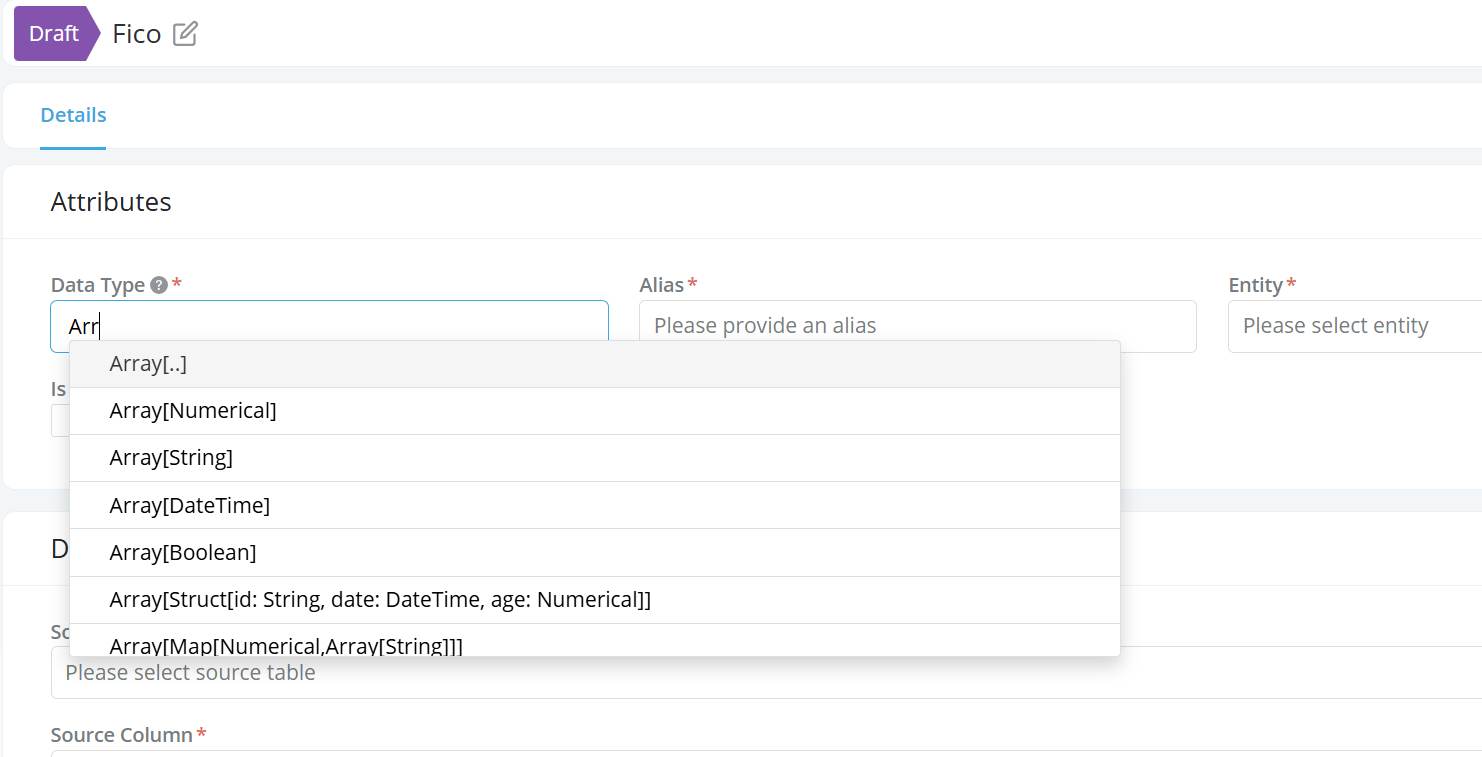
These data types can be used across the platform - in Data Elements, Features, Models, Runtime Parameters, Global Functions, and others.
3. Approvals & Monitoring
3.1 Sequential Approval Responsibilities
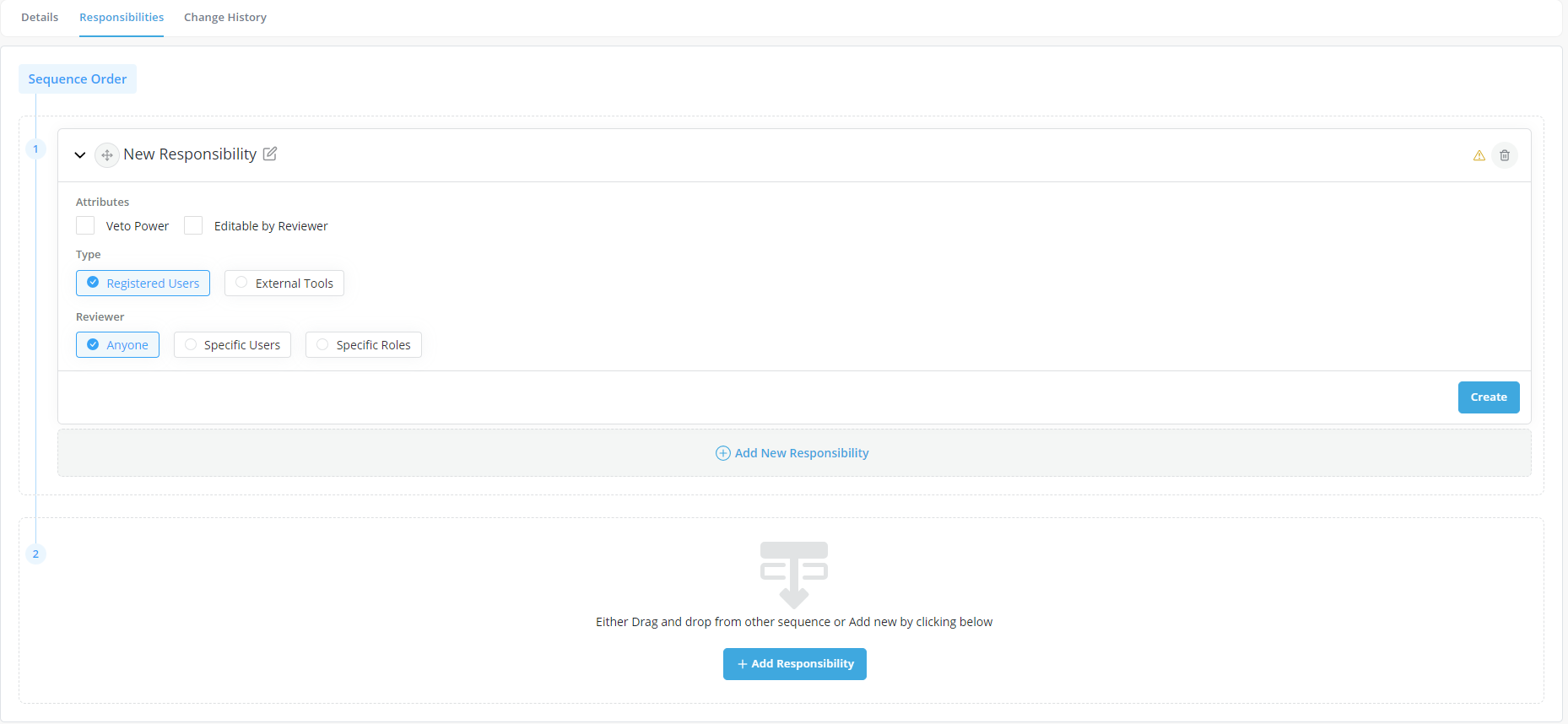
To maintain robust and clear governance flows, we have multi levels of approvals that can be managed on the system. To enforce specific flows that users should follow during approvals, we now introduce Sequential Approval Workflows.
Now, a Sequence Order can be defined in a workflow, and specific responsibilities can be added in a sequence group. A user cannot send a review request to a sequence until all previous responsibilities (in previous sequences) have been completed.
3.2 “Is Latest Approved Version” in Monitoring Dashboard
A new column “Is Latest Approved Version” is now available in the Governance dashboards. This is similar to the existing “Is Approved Version” flag but helps identify the latest approved version for tracking.
4. Various Usability Improvements
Over the next few releases we plan to bring better training documentation inline into Corridor so that users are able to access any help content while they use the platform.
As part of that, a few initiatives have been started in this release and will be enhanced over time.
4.1 Profile Page
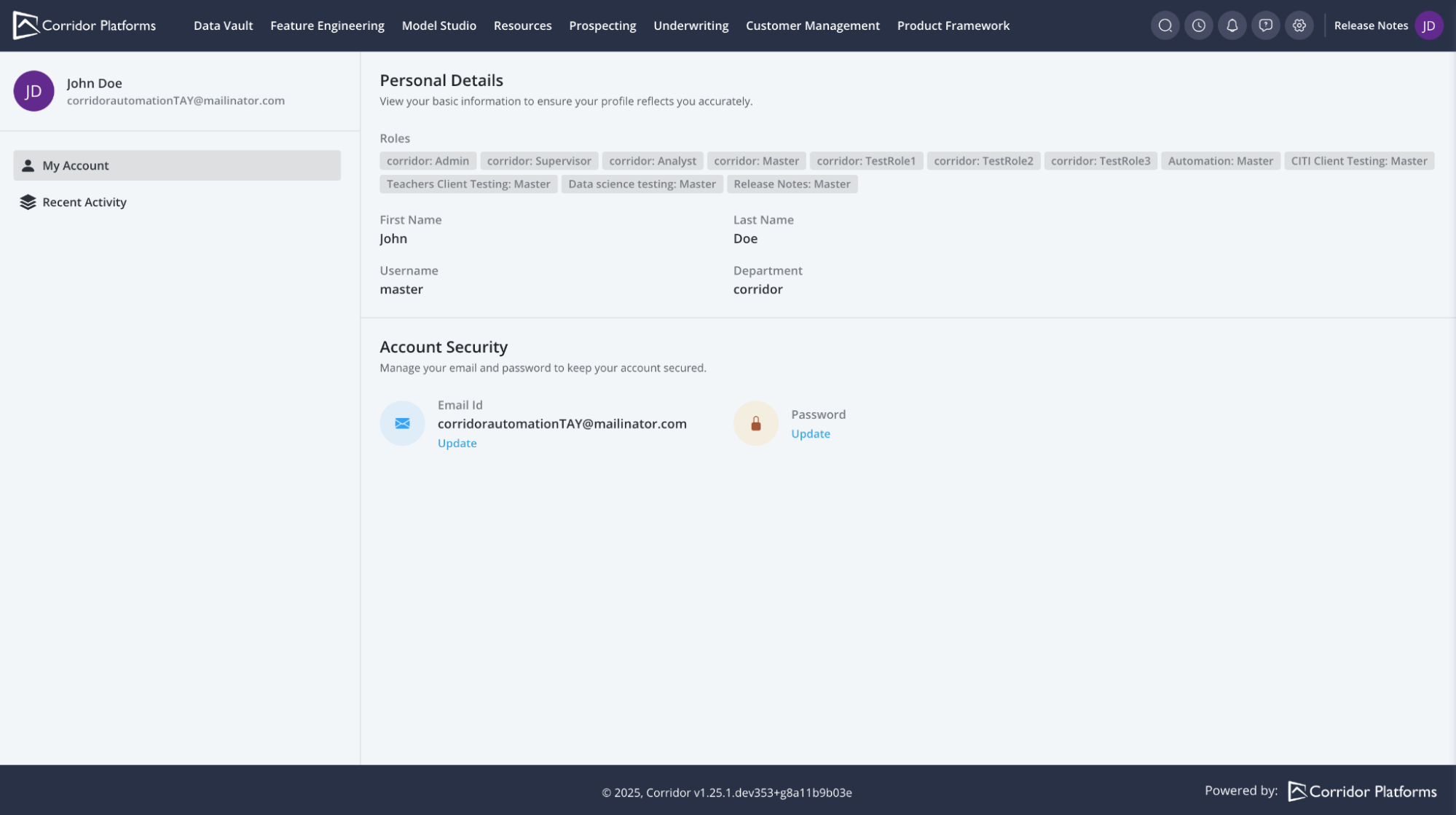
With the new profile page, you can effortlessly access your account details, review roles. This aims to provide users a clearer idea about their profile configurations and accesses available to them.
4.2 Home Page
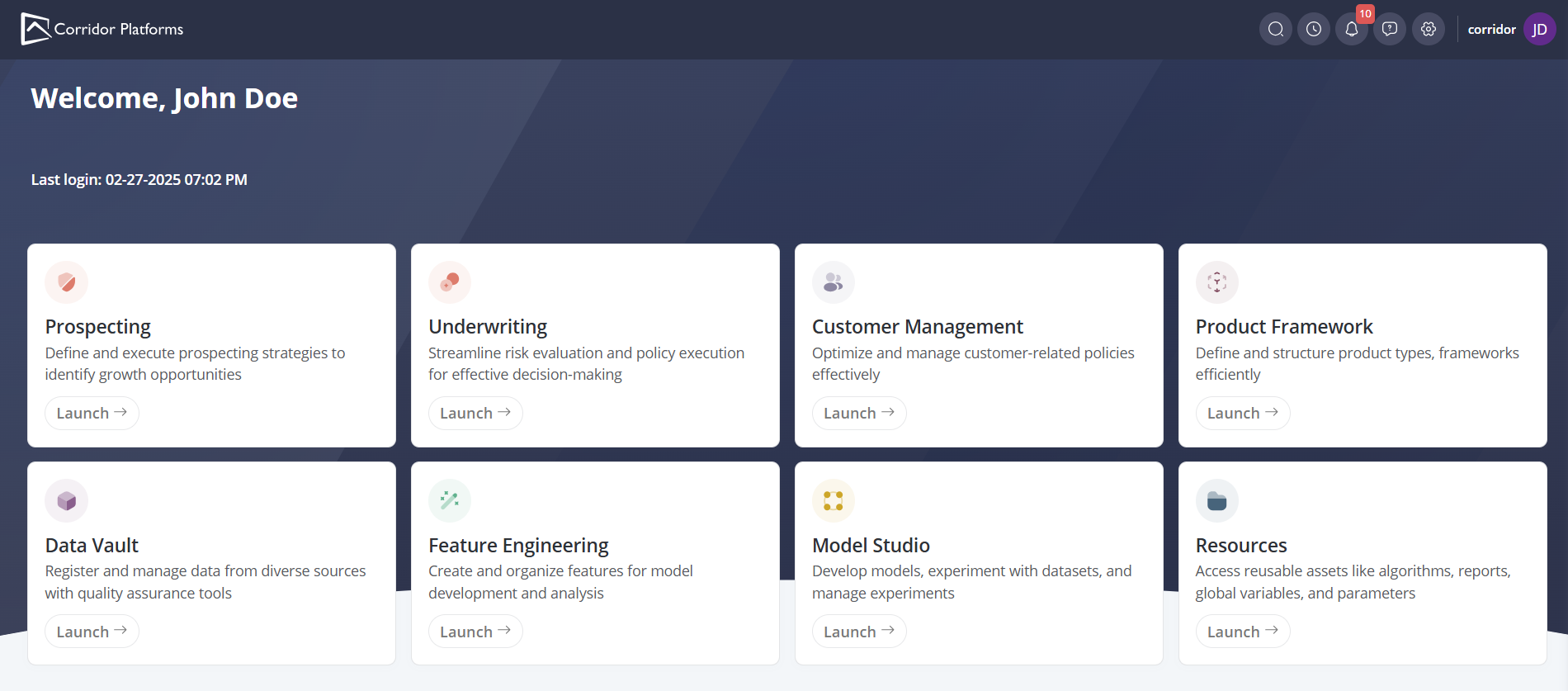
In our re-designed home page, we have added brief descriptions to each module, ensuring smoother navigation from the start.
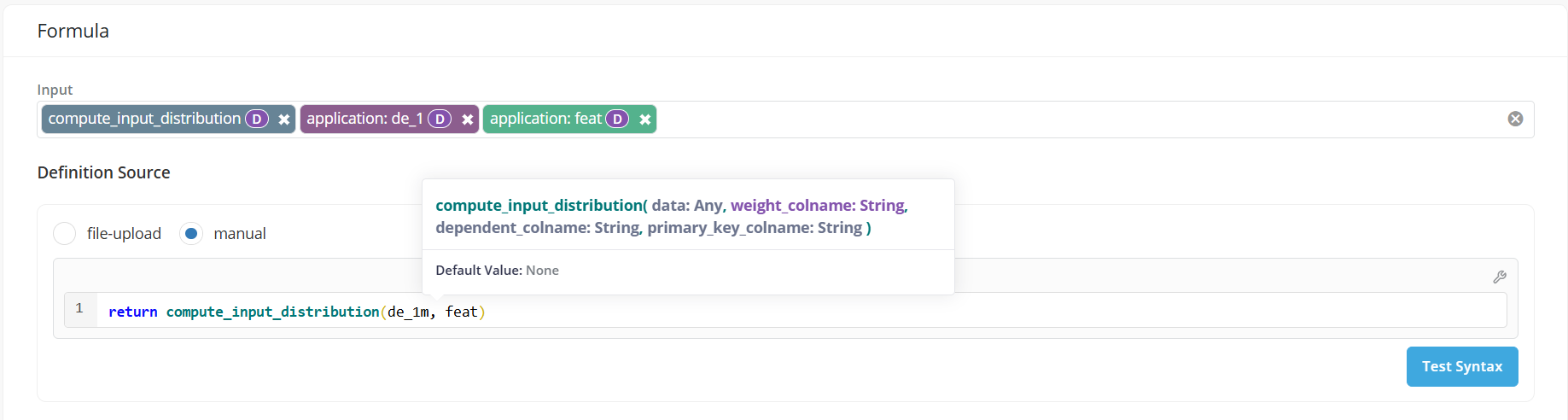
4.3 Intellisense for Global Functions when writing Definitions
While writing python code for Data Elements, Features, Models - we now support a quick view to see information about the global function that is being used in the code. This allows for easier access to essential information while using the function: The alias, inputs, arguments, and description - and a link to open the Global Function directly.
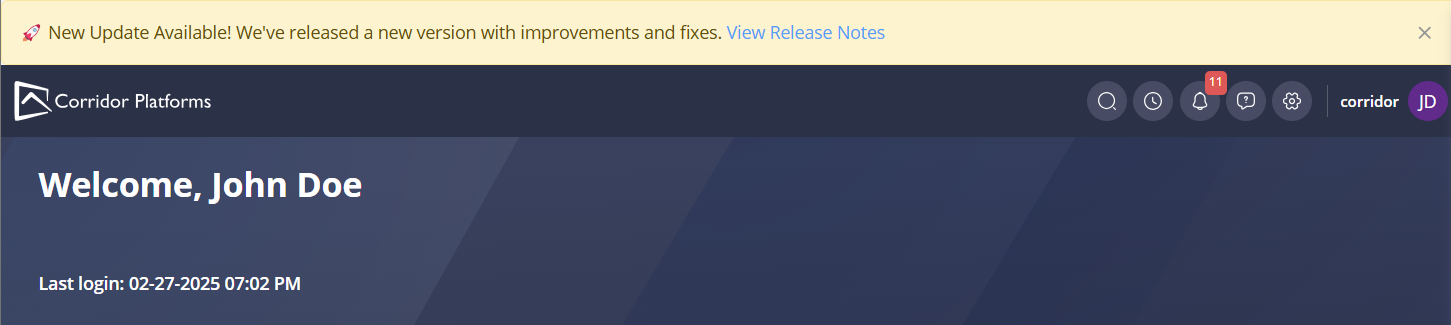
4.4 Release Banner
Stay updated with the new Release Notification Banner. This feature ensures that you are always informed about the latest capabilities available on our platform.
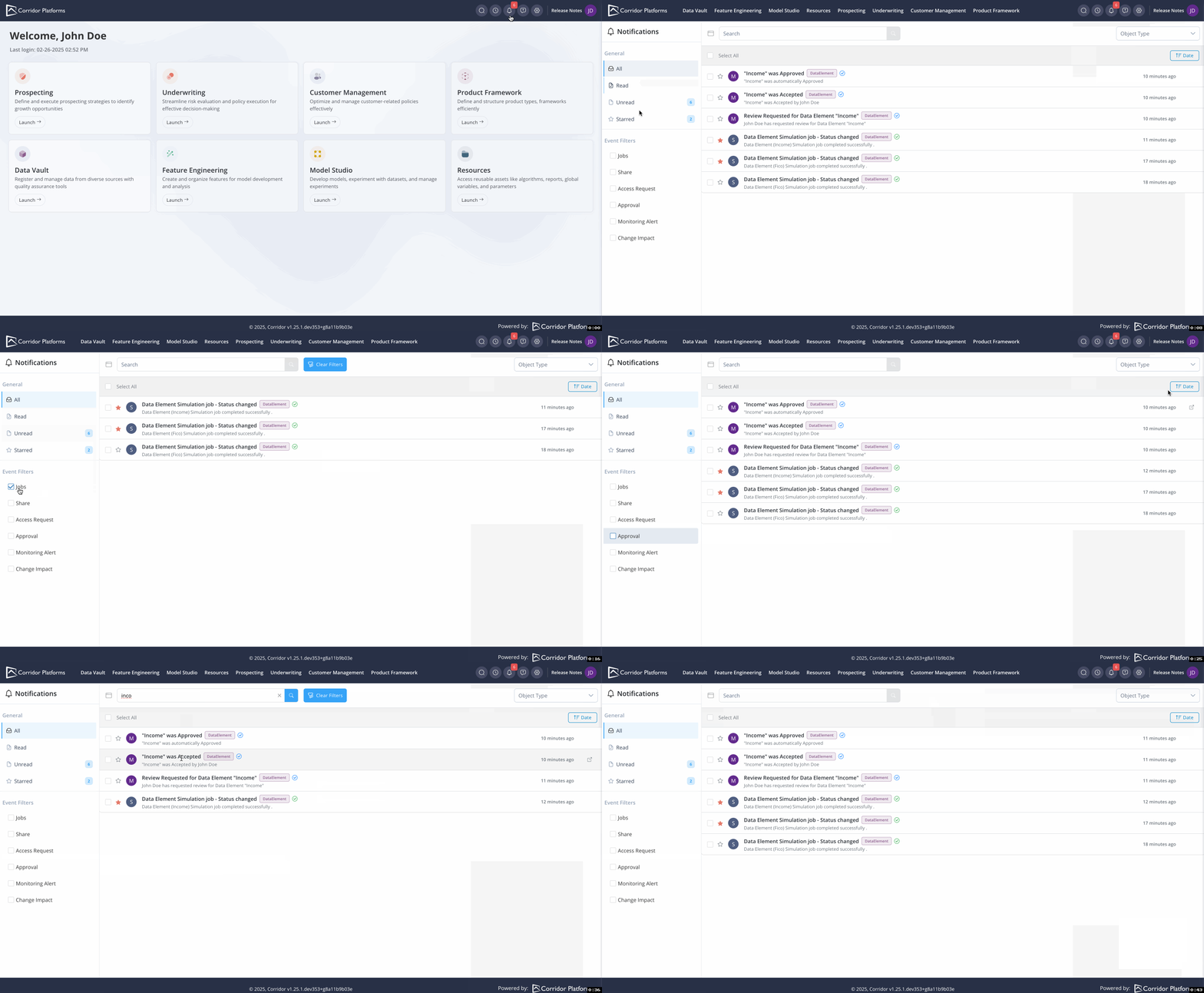
4.5 Notification Management
Our new notification page ensures you are always up to date. Key features include:
- Event Filtering: Easily filter notifications by events, such as approval notifications, to be the first to know when your model is approved or requires more information.
- Starred Notifications: Star important notifications so you can quickly return to essential follow-ups.
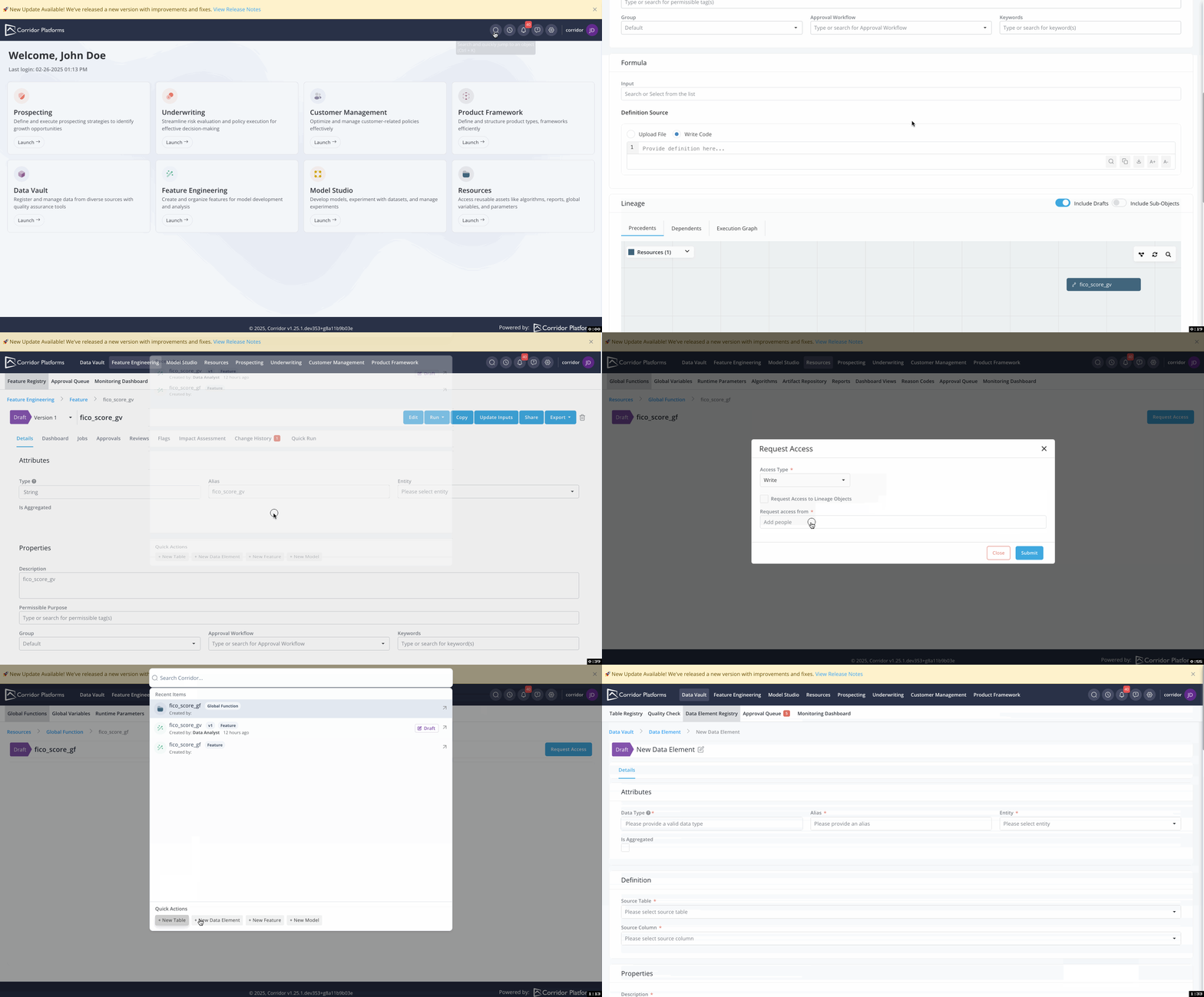
4.6 Global Search for Any Objects
Being able to search for any registered objects across the platform is essential in the daily activities on the platform.
Key Features:
- Comprehensive Search: Instantly search for any registered objects on the platform, ensuring you can quickly access what you need.
- Recent Items: Quickly go back to a recently opened items making it easier to switch back and forth between objects
- Hidden Drafts: Discover hidden drafts created by other users, request access, and seamlessly incorporate them into your workflow.
- Quick Additions: If the objects you need haven't been created, you can swiftly add new Tables, Data Elements, Features, and Models.
5. Technology Updates
5.1 New Versioning Scheme - Calver
We will follow the Calendar versioning from now on - with the scheme: v1.YY.MM
We aim to make it simpler for users to understand quickly which version they are on - and will ensure backward compatibility across all releases within a year.
5.2 Backend Reports have been removed
The older Backend-based reports which were deprecated in v1.21 - have been removed in favor of the Resources > Reports and Resources > Dashboard View.
The new UI based Reports are much more user friendly, with better tooltips when creating a report as well as approval workflows and all the other governance aspects that Analytics on Corridor brings to you.
5.3 Deprecating Python 3.8 Support
Since a year - Python 3.7 has been deprecated as it was marked as End Of Life. With Python 3.8 also being marked as End of Life - we now drop active support for Python 3.8
From our next release, both Python 3.7 and 3.8 will be removed.
If any active deployments are using these versions - we urge you to upgrade them to avoid any issues in the future.
5.4 User class in corridor-python for created_by
The created_by property in corridor-python has changed from a string to a User class. For example:
created_by == 'master'
is now:
created_by.username == 'master'
5.5 "Is Partitioner" flag has been removed
Tagging the column as partitioner in Table Registry has been removed and is no longer required to use the column in subsetting criteria when running jobs.